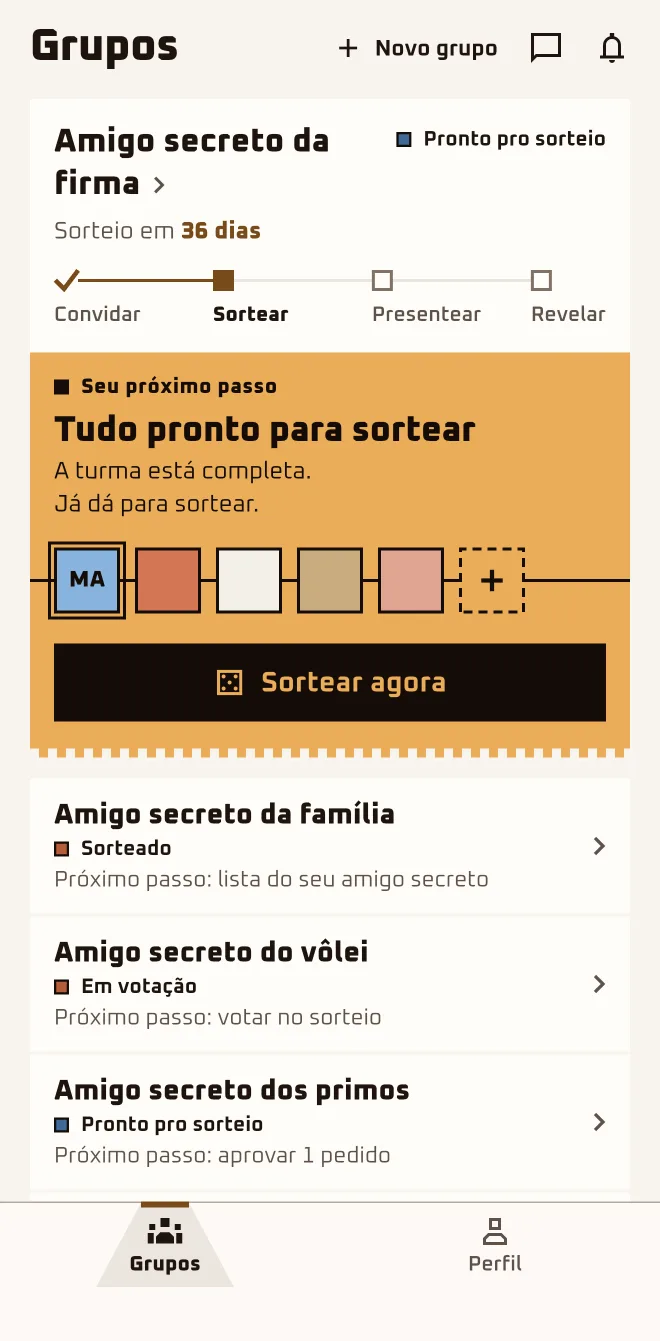
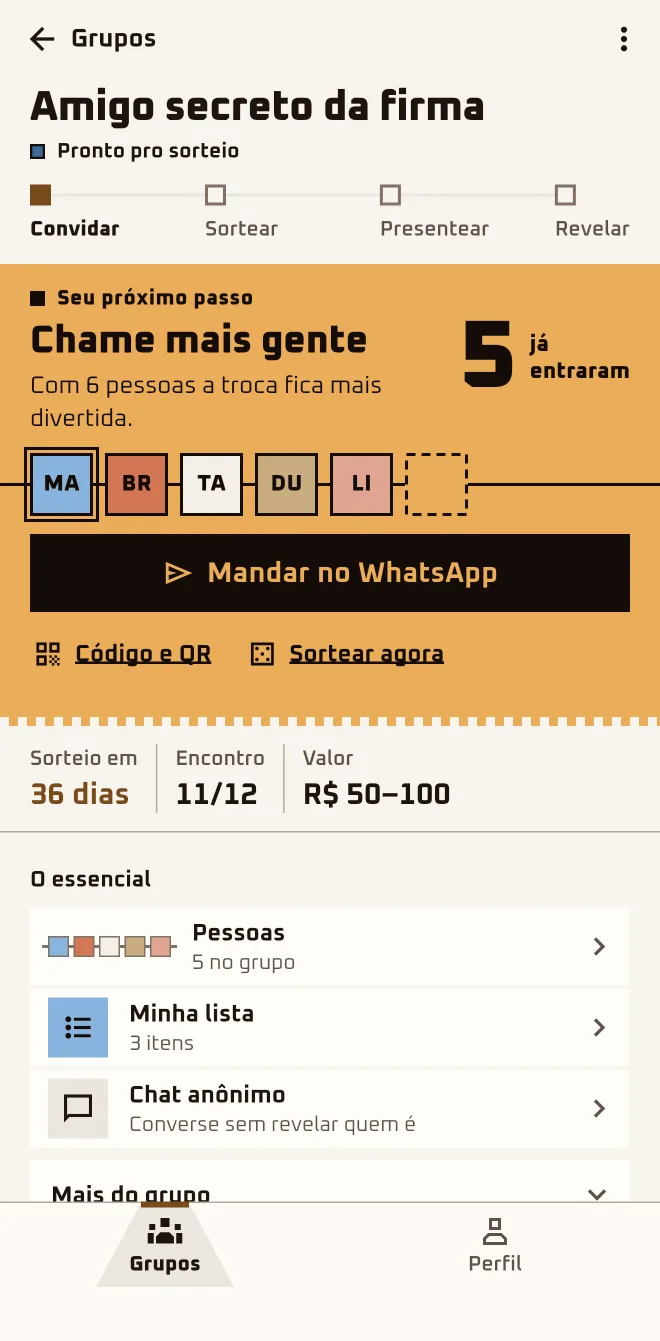
From the WhatsApp link to the recap. The app walks the group through four steps (Invite · Draw · Give · Reveal); rounding up the crew comes before and the recap comes after.
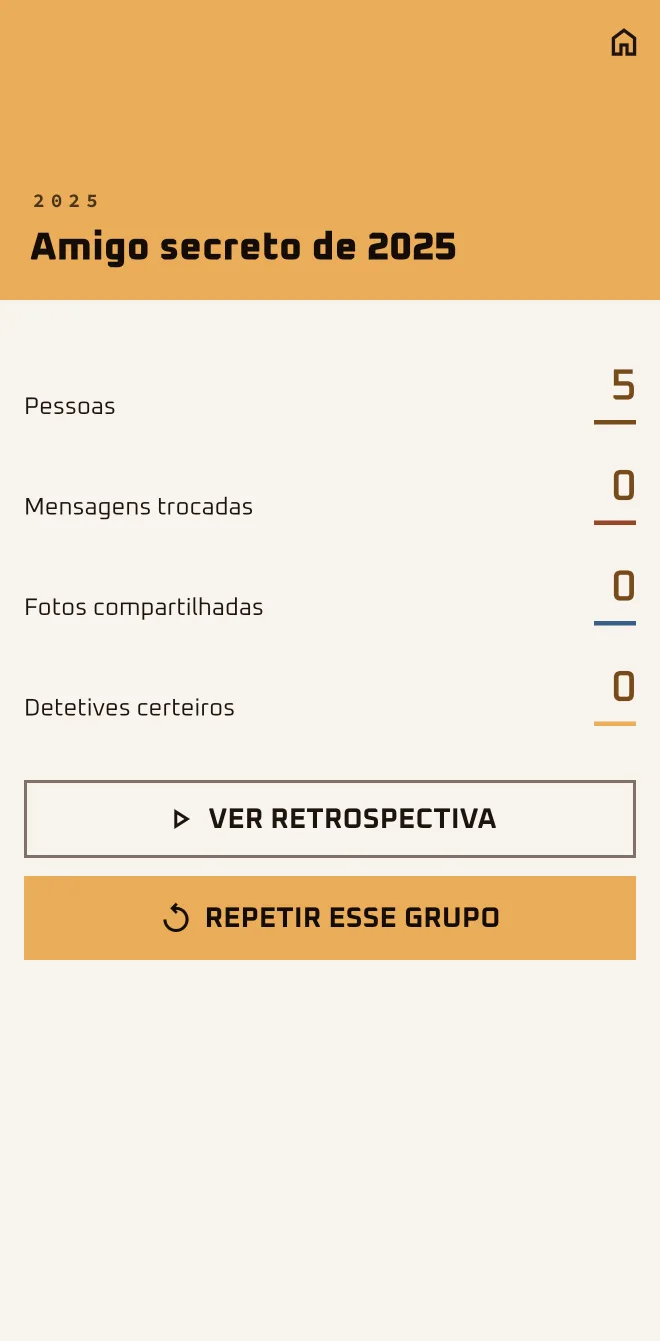
The recap arrives, the group becomes a chapter in "Your memories" and you can do it again with the same crew.
Part 1
Before the draw
SETTING UP
Chapter 1
SETTING UP
I got a link or a code
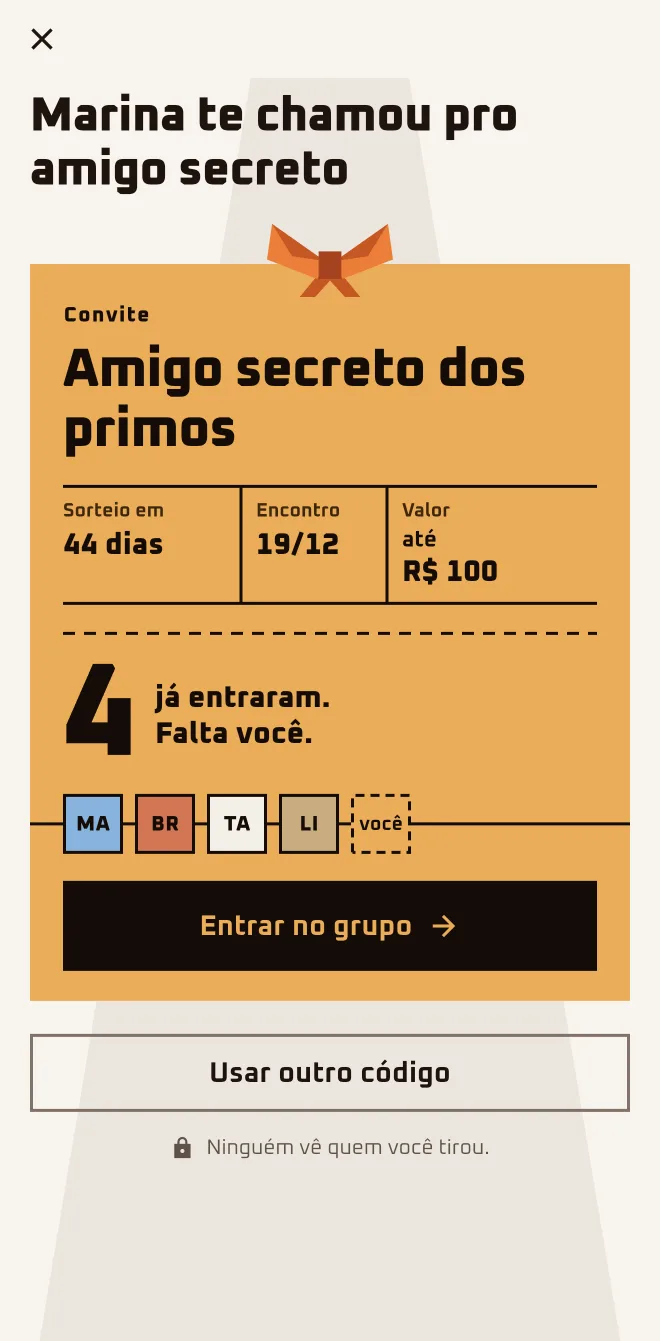
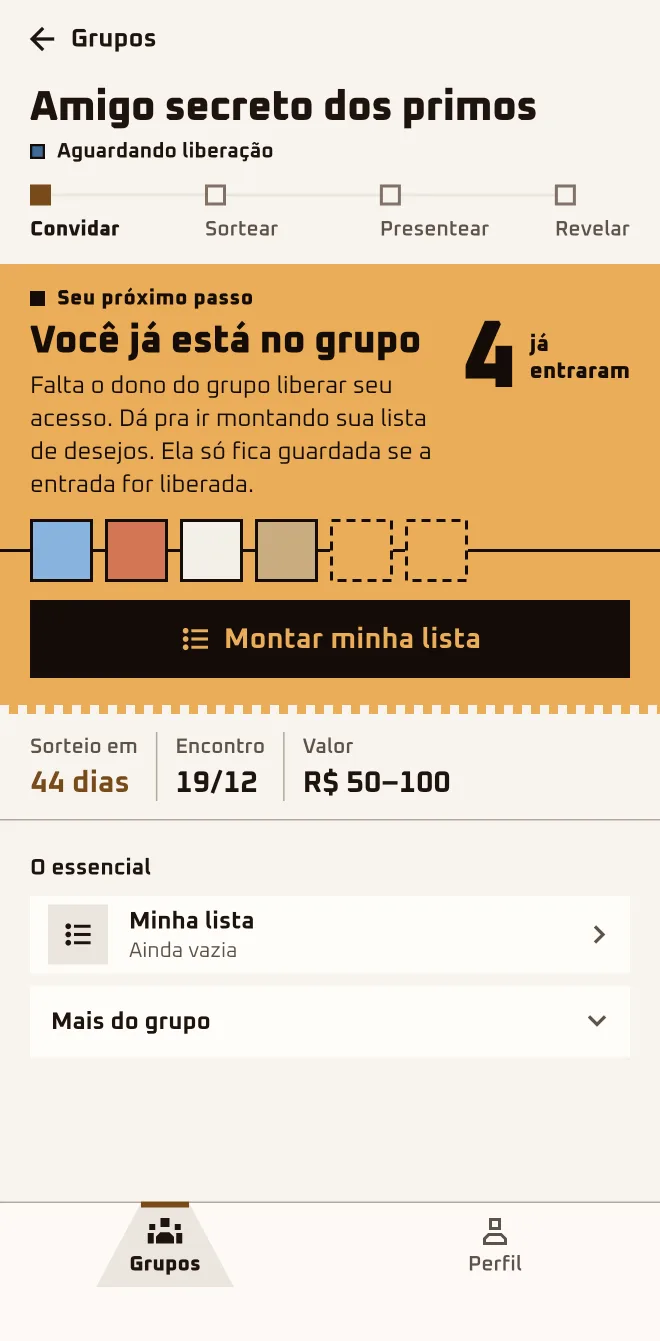
Marina dropped the link in the family chat: "Jump in, the draw is on the 5th." Bruno tapped the link on the bus, without the app on his phone, and joined right there in the browser. Now he's "Waiting" for Marina to let him in.
Screen 1App screen 2.6.4 · pt-BR
Screen 2App screen 2.6.4 · pt-BR
Screen 3App screen 2.6.4 · pt-BR
Sample group: Cousins. Made-up names.
I'm hereWhatsApp›invite link›Join now, no download needed›Google or Apple›Join the group
I'm hereOn a computer›invite link›Join in the browser›Google or Apple›Join the group
I'm hereGroups›New group›I have a code›Invite Code›Join Group
1
Tap the link and look at the invite
The page shows the group's name, the organizer's first name, how many people have already joined, the draw date and the gift price range.
2
Pick: browser or app
The big button says "Join now, no download needed" (on a computer, "Join in the browser"). "I'd rather use the app" takes you to the download page.
3
Sign in with Google or Apple
There's no password to make up: you sign in with Google or Apple. You need to be 13 or older, and app and browser ask for your birth date.
4
Ask to join and wait
Tap "Join the group". While "Waiting" for the organizer to let you in, you can tap "Start my wishlist" (in the browser, "Build my wishlist").
5
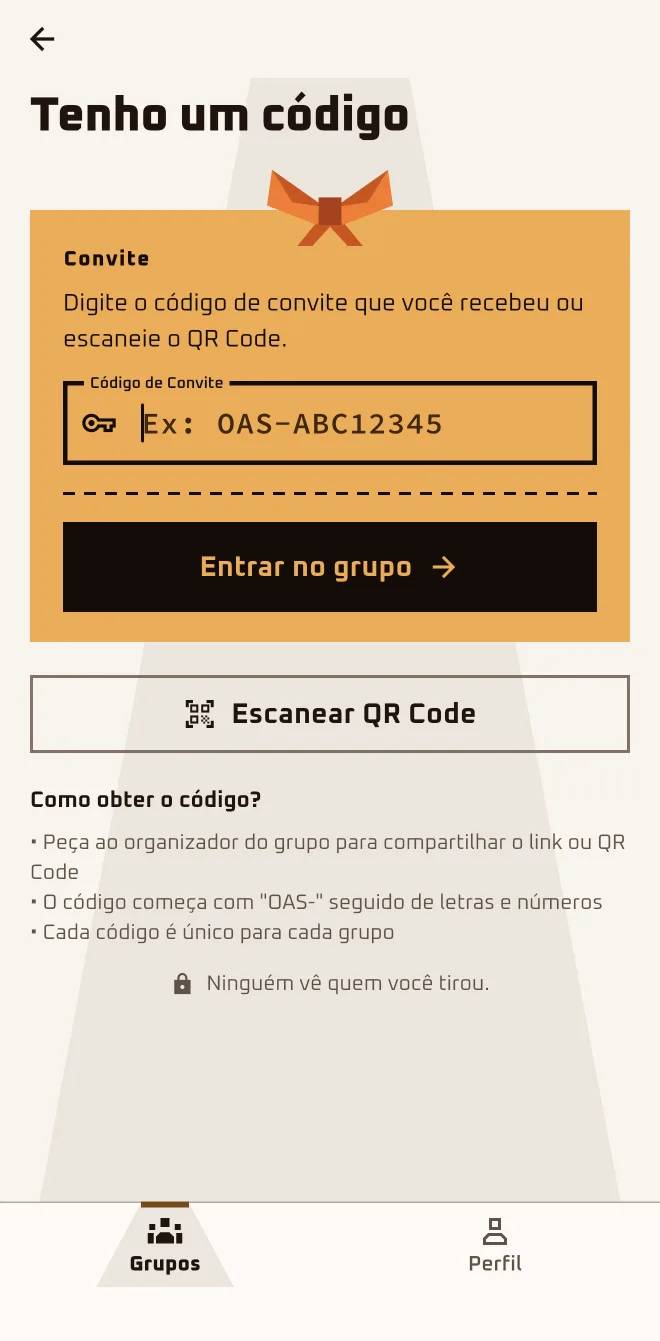
Have a code? Type it in the app
On the Groups tab, tap "New group" and "I have a code". Type it in the "Invite Code" field and tap "Join Group" or "Scan QR Code".
Works in your browser. Nothing to install.
Anyone who joins stays "Waiting" until the organizer lets them in. If the draw happens first, you sit this one out.
Do I need to download the app to take part?
No. The big button on the invite gets you in through the browser: on your phone it says "Join now, no download needed"; on a computer, "Join in the browser". Anonymous chat, hints and phone notifications are only in the app. If you'd like, tap "I'd rather use the app": the download page comes with your code on it.
I tapped the link and it opened in the browser, not the app. Is that right?
That's right. Without the app installed, the link opens the invite page on the site. With the app installed, the same link opens straight in the app. If you'd rather have the app, tap "I'd rather use the app" and install it: if it asks, type the code shown on the download page.
I joined and it says Waiting. Is it stuck?
It's not stuck. Anyone who joins through the link or the code stays "Waiting" until the organizer lets them in, and the app lets you know when that happens. If it's taking a while, tap "Remind the owner" (in the browser, "Let the owner know"): the screen shows when you can send another one.
Can I start my wishlist while I wait?
You can. The list is only kept if you're let in; if you tap "Leave", the list you started there is deleted. Tap "Start my wishlist" and start adding gifts.
It says the group already did the draw. Am I out?
This time, yes. After the draw nobody else gets in: the app shows "This group's draw already happened. It's too late to join." Anyone still "Waiting" when the draw happens is removed from the group. Your best bet is to ask the organizer to set up another group, or to create your own and get the crew in.
I have a code, not a link. Where do I type it?
In the app, go to the Groups tab: tap "New group", then "I have a code", type it in the "Invite Code" field and tap "Join Group". In the browser, open play.oamigosecreto.app/join, paste the code or the whole link in the "Invite link or code" field and tap "Join Group".
I joined in the browser. Is it the same account in the app?
It's the same one. Browser and app sign in with the same Google or Apple account and show the same groups; there's no email-and-password login anywhere. Install the app and sign in with the same Google or Apple you used in the browser: the group is already there.
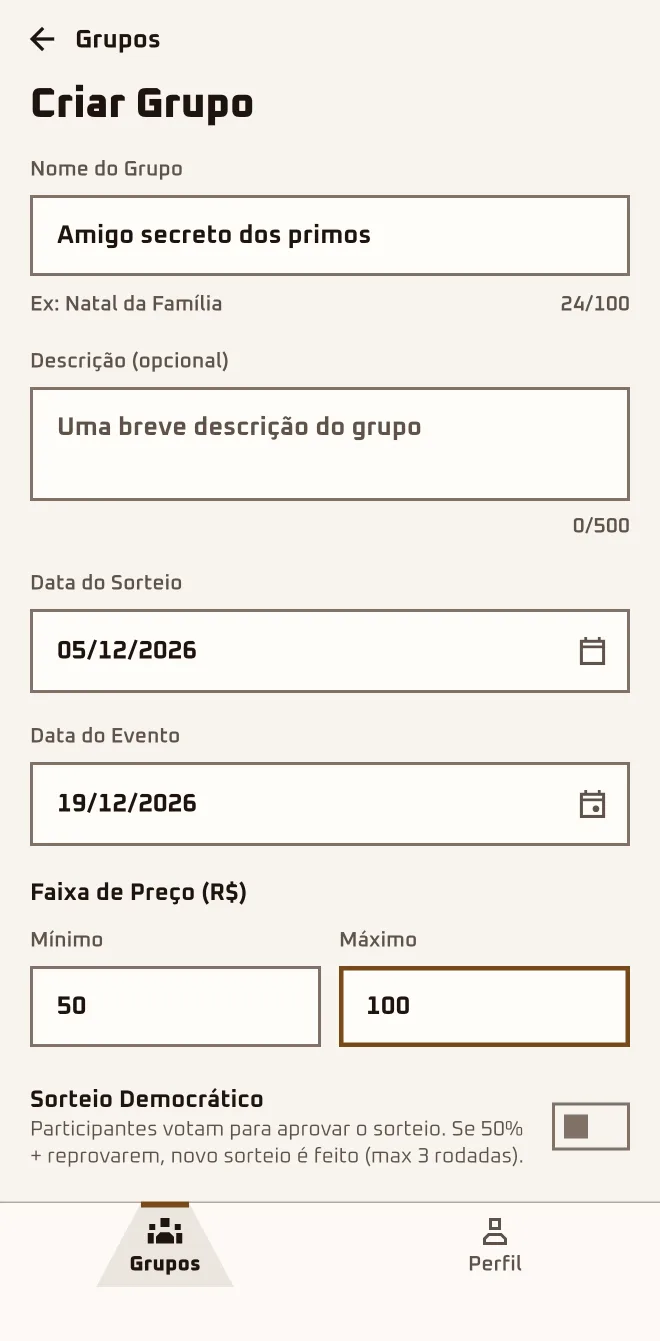
This year Marina made up her mind: no paper slips in a bag, no uncle drawing names in the WhatsApp group. She created the group "Cousins' Secret Santa" on her phone with a name, two dates, the gift budget and the vote turned on.
Screen 1App screen 2.6.4 · pt-BR
Screen 2App screen 2.6.4 · pt-BR
Screen 3App screen 2.6.4 · pt-BR
Sample group: Cousins. Made-up names.
I'm hereGroups›New group›Create a group›Create Group
In the browserplay.oamigosecreto.app›New group›Create and invite
1
Tap "New group"
In the "Groups" tab, tap "New group" and pick "Create a group". The other option, "I have a code", is for people who got an invite.
2
Name the group
The "Group Name" is required and shows up in the invite. The "Description (optional)" is where you tell the crew how it's all going to work.
3
Set the two dates
The "Draw Date" can be anywhere from tomorrow to a year ahead; the "Event Date" is the get-together and comes after the draw.
4
Agree on the budget
Under "Price Range (R$)", fill in "Minimum" and "Maximum". The app starts you off with a suggested range; swap it for the amount the crew agreed on.
5
Decide on the vote and create the group
With the "Democratic Draw" switch on, the crew votes on the result after the draw. Tap "Create Group": the group opens with the invite ready.
Only the organizer can change the plan.
In the app form this field is labeled "Event Date"; in the browser, "Reveal date". Here in the guide it is the get-together: the day you swap gifts.
How does a Secret Santa work in the app, start to finish?
The organizer creates the group, sends the link and lets in whoever asks to join. Each person builds a wishlist, and the organizer draws names without seeing the pairs. Each person opens the envelope, sends anonymous hints and buys the gift. On the day, the organizer reveals who drew whom; the first tap is "New group".
What dates do I put in?
Two, and both are required: the "Draw Date" and the "Event Date", which is the get-together and comes after the draw. The app suggests both, but go ahead and change them to the days the crew agreed on. Leave some room between the two: that's the time to buy the gift and open the journey's daily doors.
Can I change the date or the budget later?
Yes, and only the organizer can. Before the draw, name, description, dates and budget can all change. After the draw, the "Draw Date" locks, the "Event Date" can only move forward and the budget can still change. To make a change, open the group and tap "More options" › "Edit".
Should I turn on the Democratic Draw or not?
Turn it on if your crew likes to have a say. The organizer still draws the names the same way; every participant with an account sees who they drew and votes: approve or ask for another. Without the switch, the draw is final right away. It only exists in the creation form, so decide before you tap "Create Group".
Right now a group holds up to 50 approved people; anyone marked "Waiting" doesn't take up a spot. It only takes 2 to draw names, and with 3 it turns into a surprise. Bigger crew than that? Create a second group.
Can I create the group on a computer?
Yes. Open play.oamigosecreto.app in your browser and sign in with Google or Apple; your account and your groups are the same as in the app. Restrictions, anonymous chat, hints and the Waiting Room are app-only. Click "New group", fill in name, description, dates and budget and confirm with "Create and invite".
Does creating the group cost anything?
No. Creating the group, inviting people and drawing names won't cost you anything, in the app or in the browser. Just open "Groups" and tap "New group".
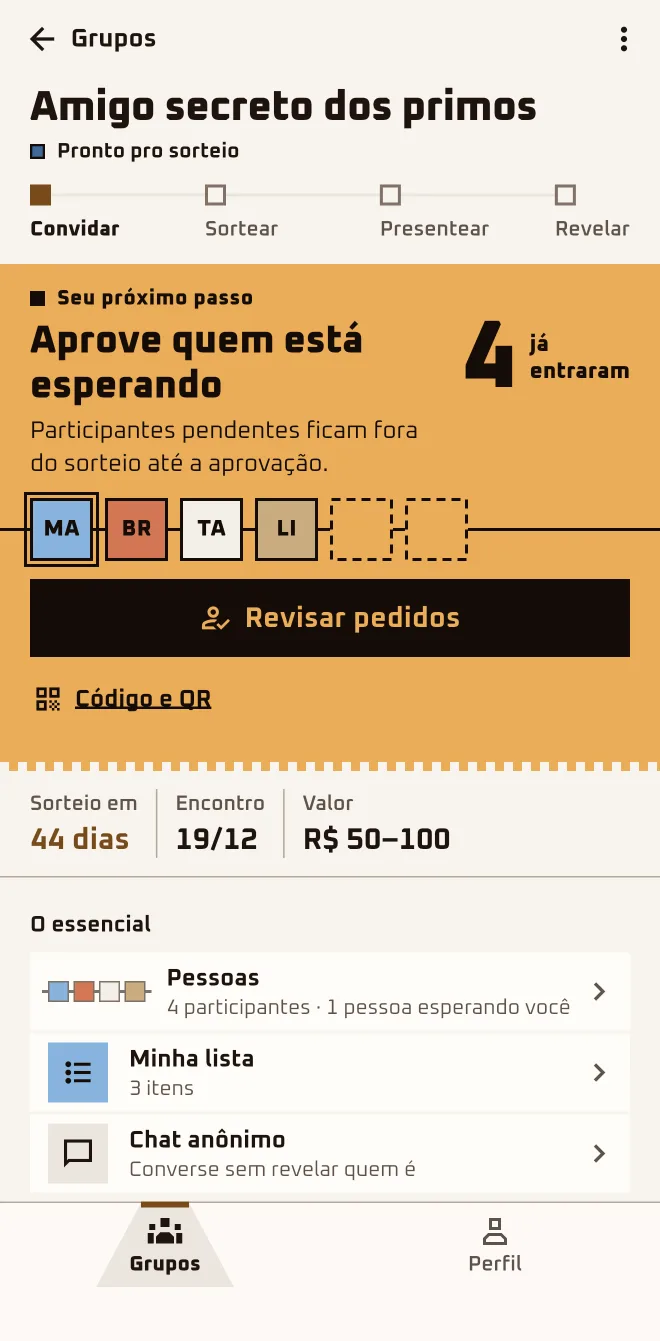
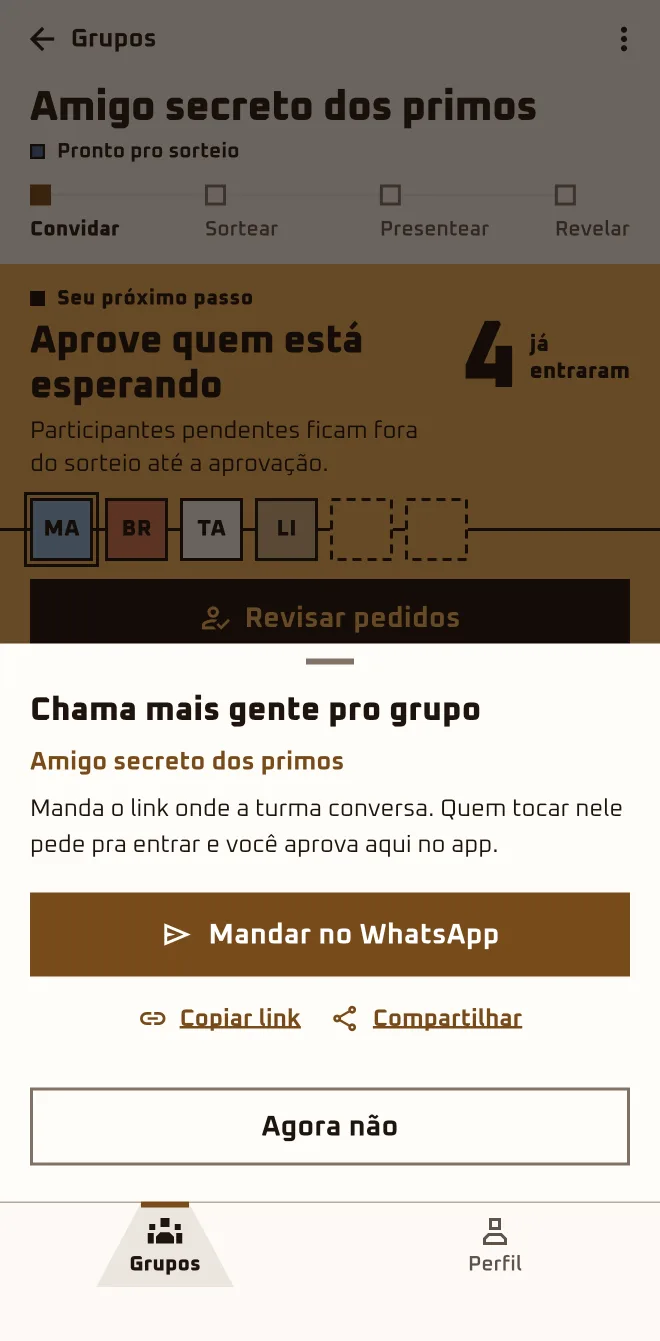
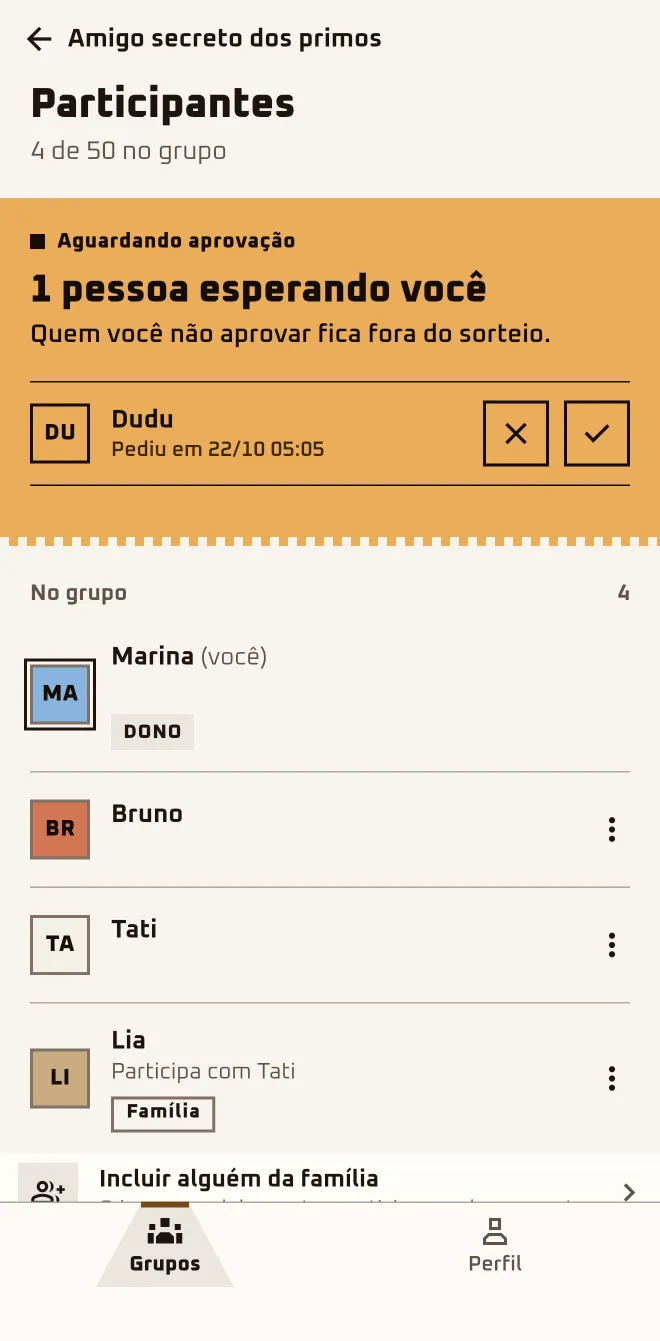
Marina sent the link to the family WhatsApp group. Within an hour, Bruno and Tati had asked to join, and the app pinged her with "Someone wants to join". She opened "Review requests" and let them both in; Dudu was still missing.
Screen 1App screen 2.6.4 · pt-BR
Screen 2App screen 2.6.4 · pt-BR
Screen 3App screen 2.6.4 · pt-BR
Sample group: Cousins. Made-up names.
I'm herethe group›Invite more people›Send on WhatsApp
I'm herethe group›Approve those who are waiting›Review requests›Waiting for approval
In the browserplay.oamigosecreto.app›the group›Invite people
1
Send the invite
In the group, tap "Send on WhatsApp": the ready-made message goes out with the link. For anyone who would rather type or scan, tap "Code and QR".
2
Whoever taps lands in the queue
Anyone who opens the link asks to join and stays "Waiting" until you let them in. You get a "Someone wants to join" notification.
3
Let in whoever is waiting
Tap "Review requests": the check-mark square lets someone in, the X square rejects. With more than one person in the queue, "Approve all" shows up.
4
Close the door if you need to
In "People" › "Joining with the code", turn off "Accept new requests". If the link leaked, "Change invite code" makes the old links stop working.
5
The crew can invite too
Each person you let in gets their own link, and it leads to the same group. Whoever invites doesn't approve anyone: the request still comes to you.
Sent the link? Now just let them in.
Only the organizer approves, rejects, pauses joining and changes the code. Anyone "Waiting" only sees the first names of the people already in.
Can we do a long-distance Secret Santa, just over WhatsApp and the app?
Yes. The link goes out on WhatsApp and each person asks to join from their own phone, wherever they are, in the browser or in the app; each person sees the result on their own device. The app comes in Portuguese, English and Spanish. Send the link and approve whoever asks.
I sent the link and nobody shows up in the group.
Anyone who taps the link asks to join and lands in the "Waiting for approval" queue: look for the "Approve those who are waiting" card and tap "Review requests". If the queue is empty, nobody has asked yet. Send it again from "More in this group" › "Resend invite" or, in the browser, from the "Invite kit".
Can I let people in without approving them?
In a regular group, no. Anyone who arrives always stays "Waiting" until you let them in. The exception is the invite to repeat a group that already ended: whoever accepts goes straight in. With more than one person in the queue, tap "Approve all" or, when you go to draw names, "Approve all and draw".
Someone I don't know asked to join.
In the "Waiting for approval" queue, tap the X and confirm with "Reject". They get "Request declined" and, after two rejections in the same group, they can't ask again. If the person already got in, open their menu in "People": that's where you'll find "Report profile" and "Block" followed by their first name.
I approved the wrong person. Can I take them out?
Before the draw, yes: in "People", open the person's menu, tap "Remove from group" and confirm. They get a notification and drop off the list. After the draw nobody leaves and nobody gets removed, not even by the organizer. Check the list before you tap "Draw names now".
The minimum is 2 approved people; with 3 it's a real surprise. With 2, "Draw anyway" is tucked away in "More in this group" › "Management"; from 3 on, "Draw names now" shows up. Anyone "Waiting" doesn't count, and the group holds up to 50 approved people. Invite one more before you draw.
How late can people still join?
Until the draw. After that, and also while a Democratic Draw vote is open, nobody new gets in. Anyone still "Waiting" when the draw happens is removed from the group. Work through the queue before you tap "Draw names now".
Agree on the rules: dates, budget, who can't draw whom, family
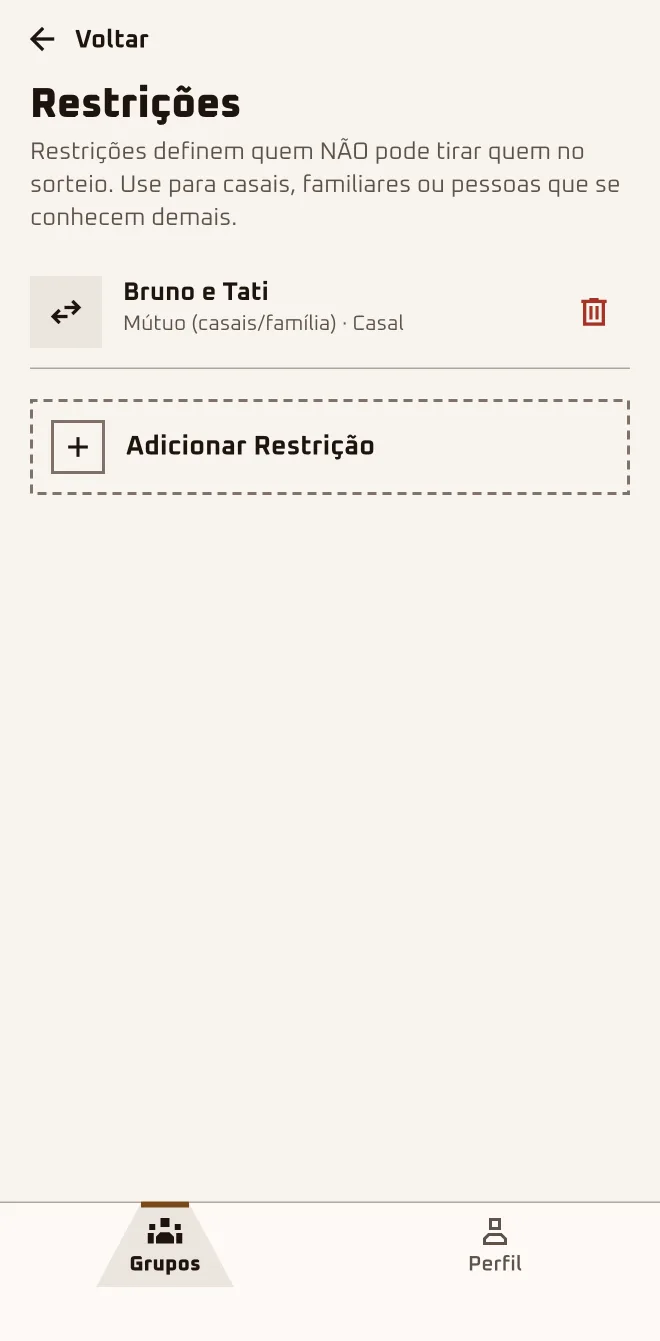
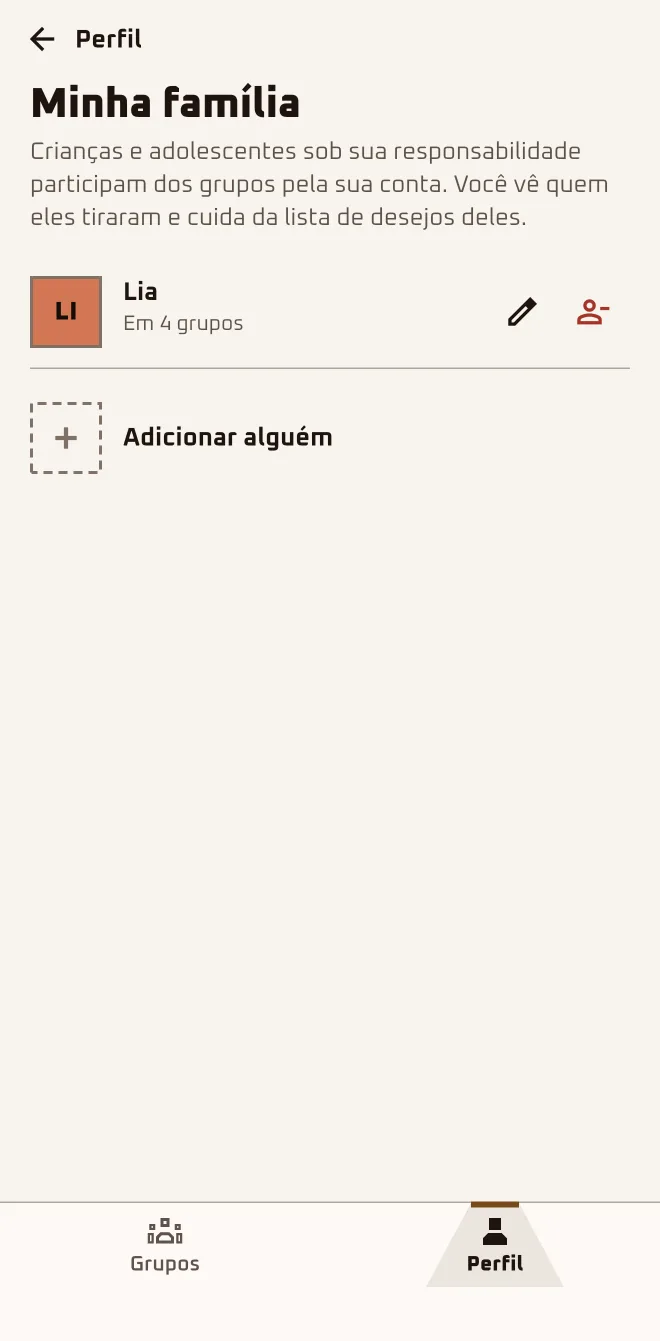
Tati and Bruno are married: they can't draw each other. Lia, 9, joins through her mom's account; Dudu, 15, has his own account. Marina settles all of it before the draw: after that nobody can add restrictions or family members anymore.
Screen 1App screen 2.6.4 · pt-BR
Screen 2App screen 2.6.4 · pt-BR
Screen 3App screen 2.6.4 · pt-BR
Sample group: Cousins. Made-up names.
I'm herethe group›More options›Edit
I'm herethe group›More in this group›Management›Restrictions›Add Restriction
I'm hereProfile›Account›My family›Add someone›then, the group›Management›Add a family member
In the browserplay.oamigosecreto.app›the group›Review restrictions
1
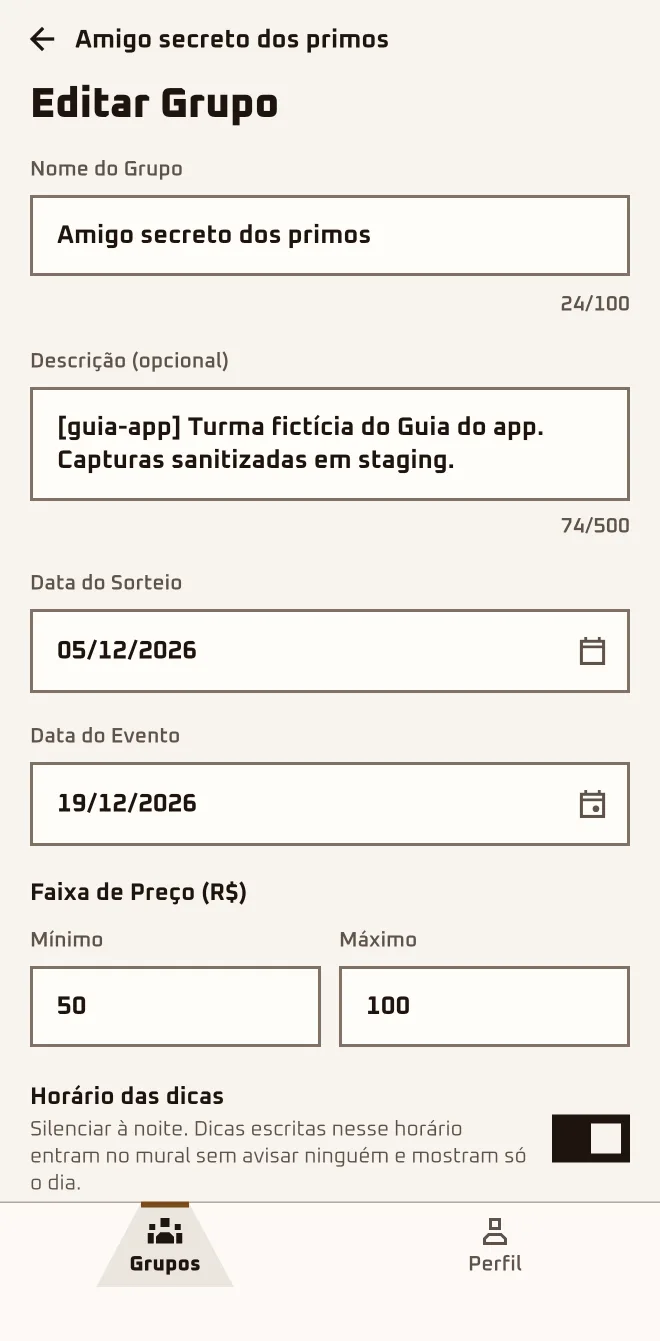
Adjust dates and budget in "Edit"
Only the organizer can change these. Name, description and price range change whenever you like; after the draw, the "Draw Date" locks.
2
Say who can't draw whom
In "Add Restriction", pick the two people, choose "Mutual (couples/family)" or "One-way". Only before the draw, with both already approved.
3
Register anyone without an account
In Profile › Account › "My family" › "Add someone", all you enter is a "Nickname". You need to be 18 or older; each guardian can add up to 5 people.
4
Add the child to the group
Tap "Add a family member" and pick the name under "Who's joining?". It only works before the draw, once your own spot is approved.
5
Send the teen the link
Anyone 13 or older creates their own account and joins through the link or the code, with no family step.
Restrictions and family: not after the draw.
Too many restrictions can block the draw: if that happens, the app warns you and saves nothing. Whoever adds someone from their family never draws that person and is never drawn by them; siblings can draw each other.
Couples can't draw each other. How do I set that up?
With a restriction. In "More in this group" › "Management" › "Restrictions", tap "Add Restriction", pick the two of them and choose "Mutual (couples/family)". Only the organizer creates restrictions, before the draw, between people already approved: if one is still under "Waiting for approval", let them in first.
I set the wrong restriction. Can I delete it?
Yes, as long as the draw hasn't happened; after it, the "Restrictions" screen disappears from the group. In "Restrictions", tap the trash can next to the wrong one and confirm with "Remove". The app replies "Restriction removed", and then you just create the right one in "Add Restriction".
My 9-year-old wants to join and doesn't have a phone.
They join through your account; under 13 that's the only way. In "My family" › "Add someone", all you enter is a "Nickname", and you confirm you're the parent or legal guardian. In the group, tap "Add a family member" and pick the name under "Who's joining?", before the draw and only in the app.
What does the child see in the app?
Nothing on a phone of their own: everything goes through your account. The others see only the nickname and the "Family" badge; the app doesn't store the child's age or photo. In the group, open "More in this group": the "{name}'s participation" section has "Wishlist", "Drawn person's wishlist", "Chats" and "Hints".
My son is 15 and has a phone. Does he need to join through family?
No. At 13 or older, he can create his own account and join through the link like anyone else. The Store tab stays there for him; what's adult-only is the "Find a gift" button on each hint (it opens the Store), the Store suggestions and the price-drop alert. Send him the link and let him in when he asks to join.
Can I change the get-together date after the draw?
Yes, but only forward: after the draw, the get-together date can be extended, never shortened, and extending it adds new doors to the journey. The draw date, on the other hand, locks for good. To change the date, open the group, tap "More options" › "Edit" and adjust "Event Date".
What currency shows up in the group?
The one from the country of whoever creates the group: Brazil in reais, Colombia in Colombian pesos, Mexico in Mexican pesos. With no country set, it stays in reais. Check Profile › Account › "Your country" before creating the group: the budget field shows the right currency, "Price Range (R$)" in Brazil.
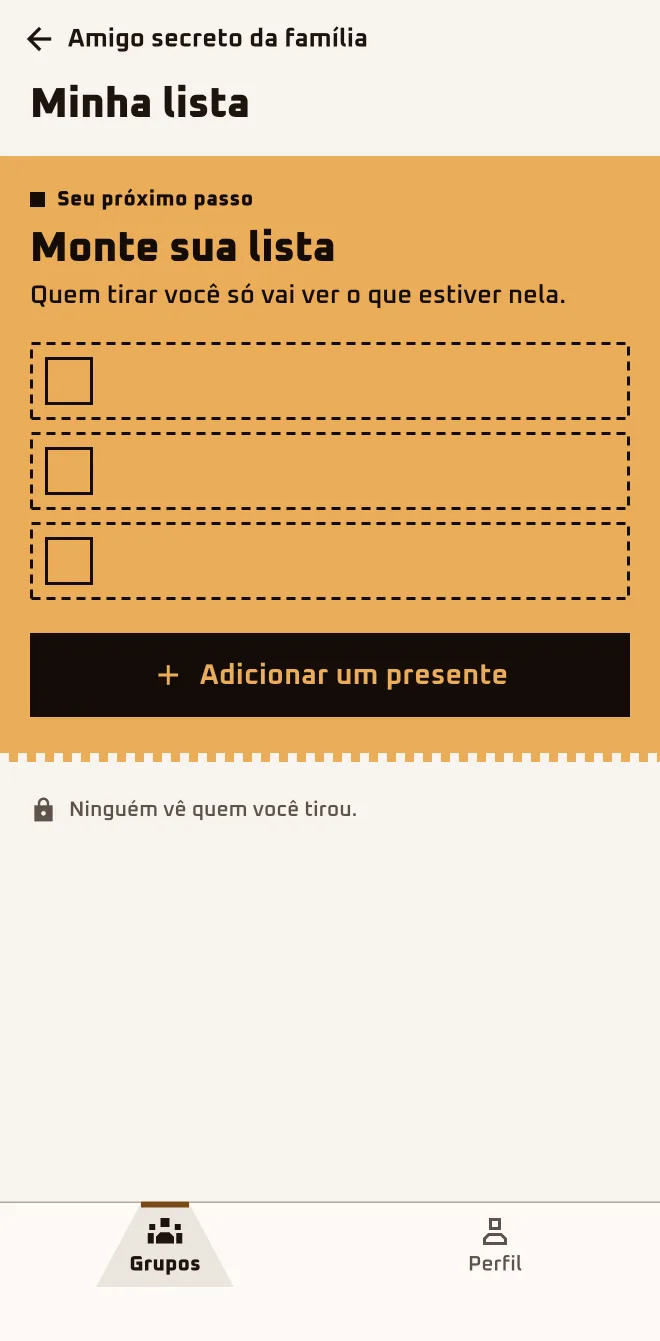
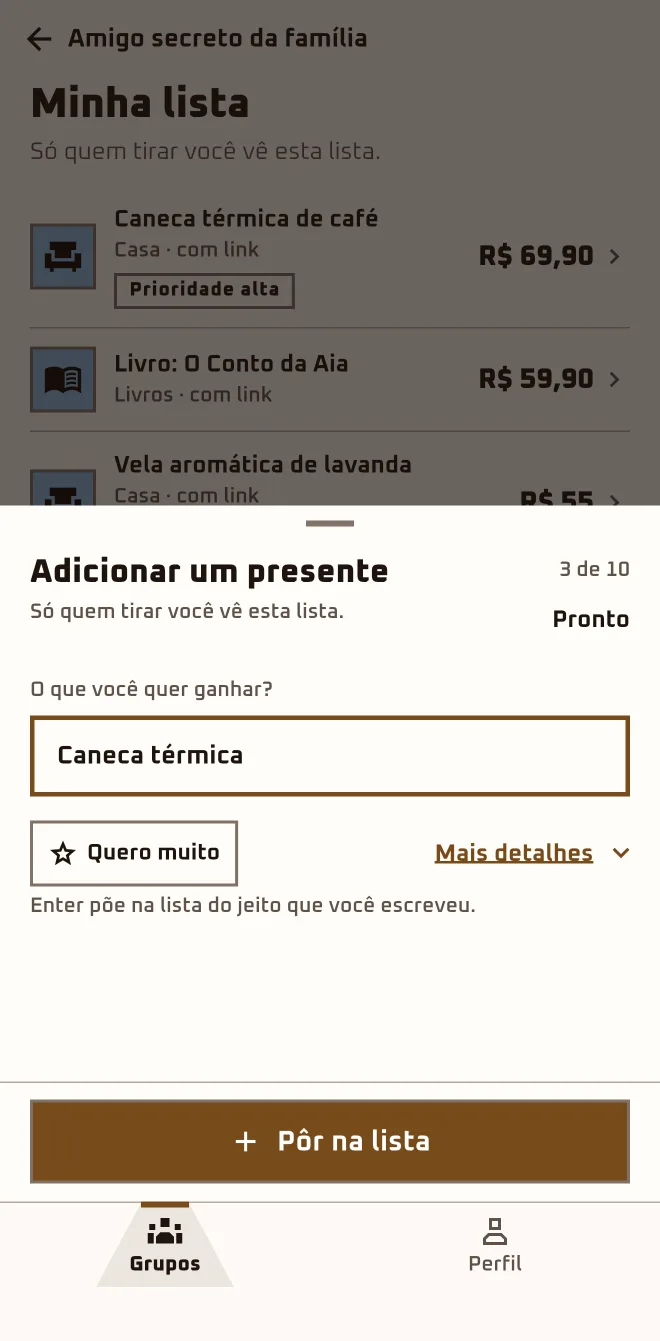
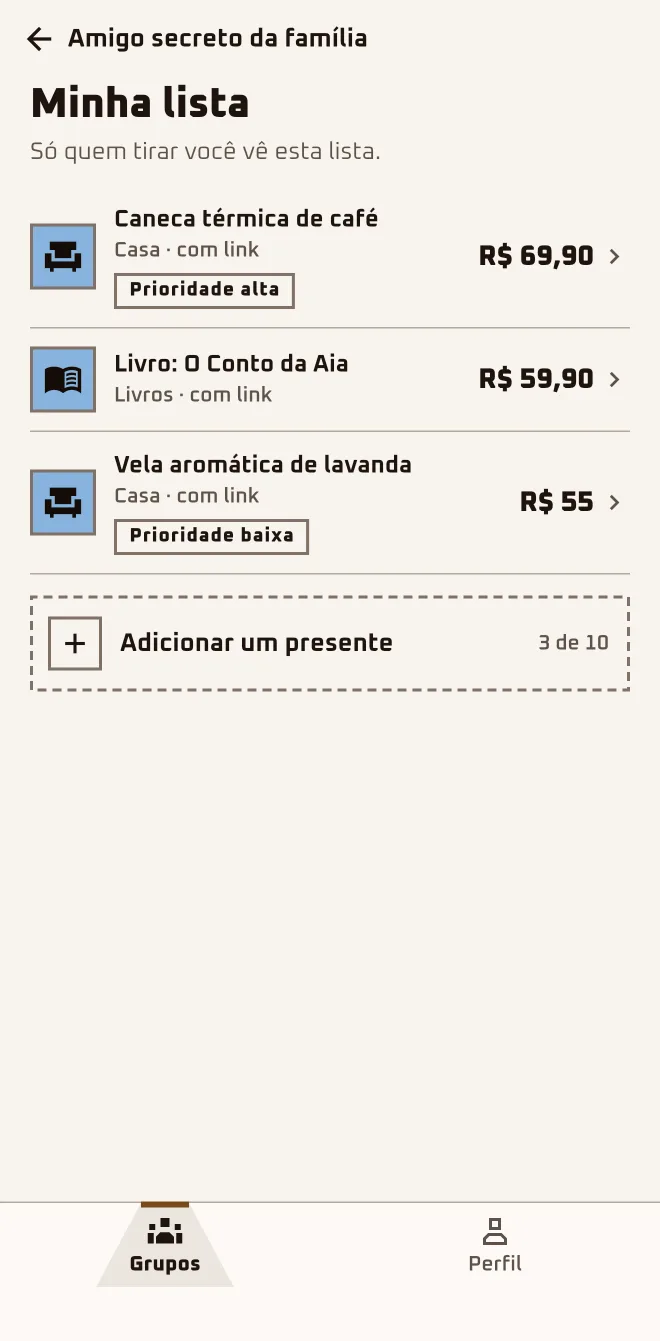
Bruno never knows what to ask for. He put down three ideas: one with a link, one with a price, the third just the name. The person who draws him will see exactly that, and nothing else.
Screen 1App screen 2.6.4 · pt-BR
Screen 2App screen 2.6.4 · pt-BR
Screen 3App screen 2.6.4 · pt-BR
Sample group: Cousins. Made-up names.
I'm herethe group›The essentials›My list›Add a gift
In the browserplay.oamigosecreto.app›the group›My Wishlist
1
Open "My list"
In the group, under "The essentials", tap "My list" and then "Add a gift". In the browser: "My Wishlist" and "Add Item".
2
Fill in at least the name
Only "Gift name" is required; the other fields help the person who draws you get it right. When you're done, tap "Add".
3
Add straight from the Store
In the "Store" tab, open the product and tap "Add to my list". If you're in more than one group, the app asks "Which group?".
4
Change it whenever you want
Tap the item to open "Edit gift"; "Delete gift" is in there. After the draw, the person who drew you gets a notification that the list changed.
Only the gift name is required.
Still "Waiting"? You can build your list, but it's only kept if you're let in.
Who sees my list?
You and, after the draw, the person who drew you. Nobody else in the group can open another person's list, not even the organizer. If someone in your family joins through your account, that person's list is in your hands too. Ask for whatever you want: open the group and tap "My list".
Do I have to add a link and a price?
No. Only "Gift name" is required. "Product link (optional)" and "Estimated price (optional)" are there so the person who draws you gets it right the first time, and the price can have cents, like 79.90. If you have the link handy, paste it; if not, the name is enough.
Can I add a photo to an item?
No. There's no photo field on the form, in the app or in the browser. An item from the Store comes with the product's name, price and link, but its picture doesn't show in the list. If you want the person to see the product, paste the link in "Product link (optional)" or add it from the Store with "Add to my list".
I'm still Waiting. Does my list count?
It does, with one condition. While the group shows "Waiting", the app lets you build the list, but it's only kept if you're let in. If you tap "Leave", the list goes too. Build it now and, if approval is taking a while, tap "Remind the owner".
I changed my list after the draw. Will the person who drew me know?
They will. When you add, edit or delete a gift after the draw, whoever drew you gets the notification "The list of who you got changed" on their phone; that notification only comes through the app. Change it all you like, but if the person already sent "I already got your gift!" in the chat, leave the list alone.
Is there a limit on gifts?
In the app, yes: the counter next to "Add a gift" shows how many items you've added and how many fit. If the list fills up, the app says "List full. Remove an item to add another." Start with what you want most and mark "High" under "Priority".
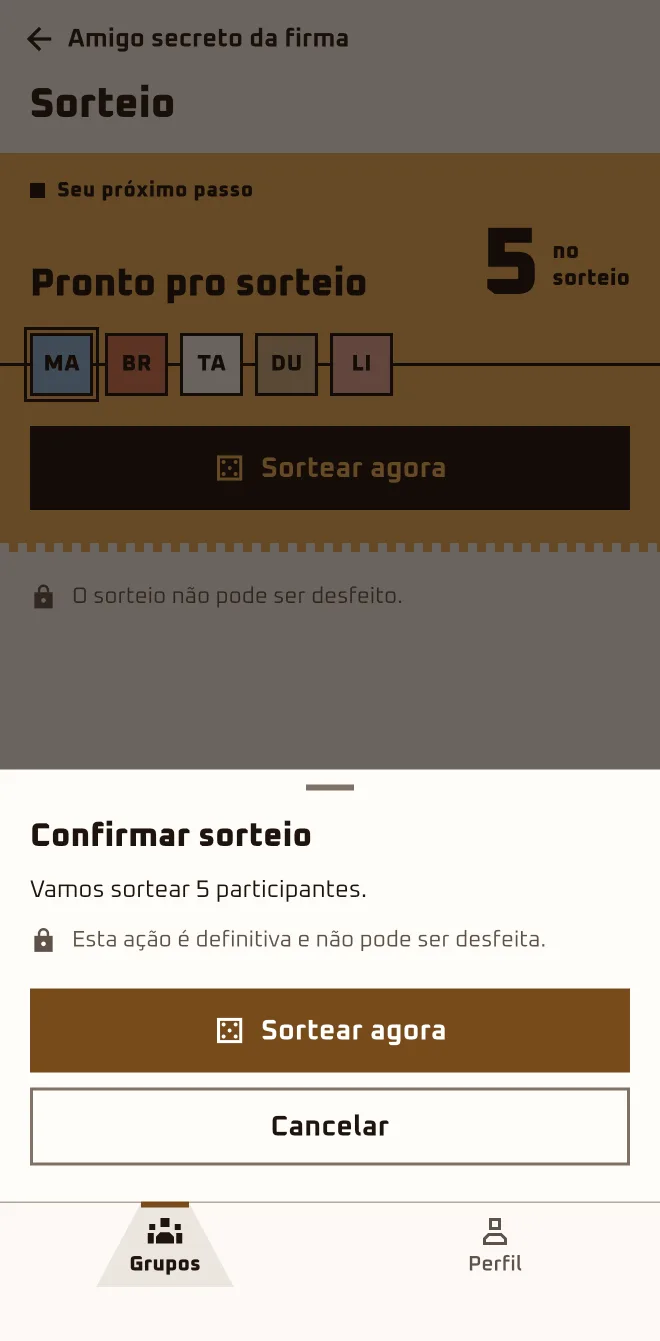
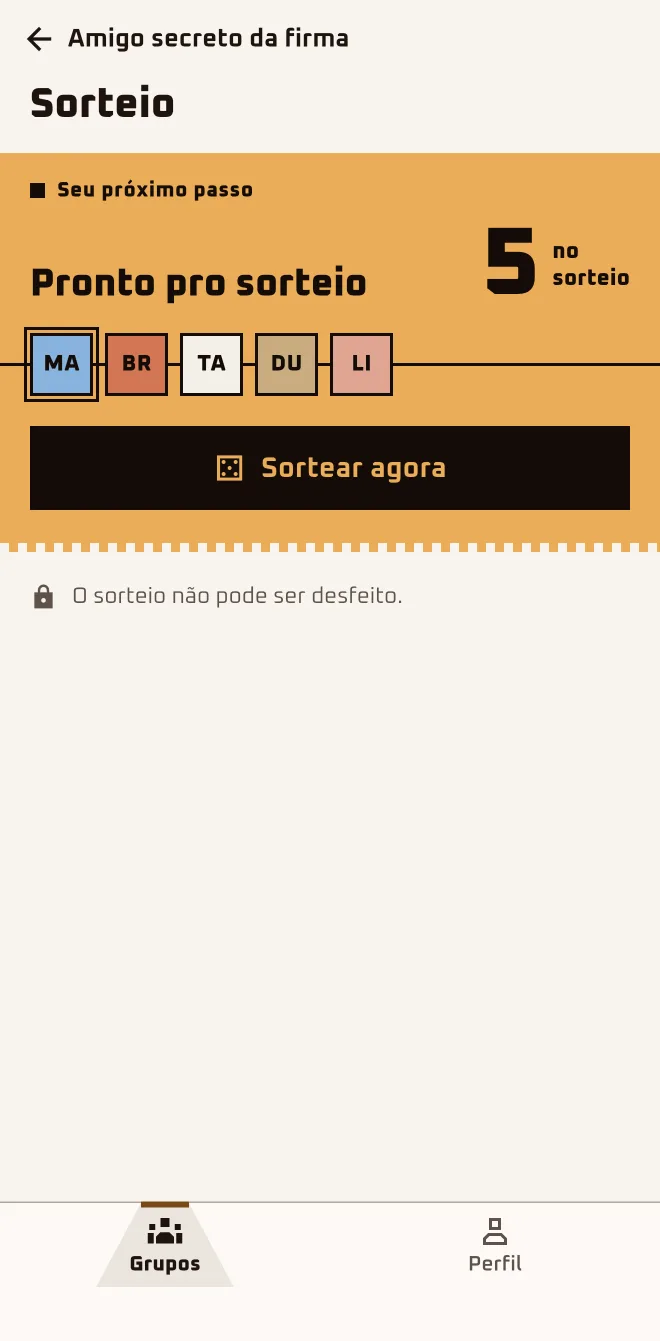
There are five: Marina, Bruno, Tati, Dudu and Lia, who's in through Tati's account. Marina taps "Draw names now" in the group, checks who's in and confirms. Nobody's uncle had to draw again in the WhatsApp group.
Screen 1App screen 2.6.4 · pt-BR
Screen 2App screen 2.6.4 · pt-BR
Screen 3App screen 2.6.4 · pt-BR
Sample group: Cousins. Made-up names.
I'm hereGroups›the group›Invite more people›Draw names now›Confirm draw
I'm hereGroups›the group›Everything is ready›Run draw›Draw names now›Confirm draw
In the browserplay.oamigosecreto.app›the group›Run the draw›Draw
1
Check who's in
Anyone under "Waiting for approval" stays out. If people are waiting, the app asks: "Approve all and draw" or "Draw without those waiting".
2
Tap "Draw names now"
With up to 5 people, the link sits in "Invite more people"; with 6 or more, the button is "Run draw". On the "Draw" screen, tap "Draw names now".
3
Confirm
The "Confirm draw" sheet warns you: "This is final and can't be undone." Tap "Draw names now": if a rule blocks the draw, the app tells you.
4
With voting on, vote too
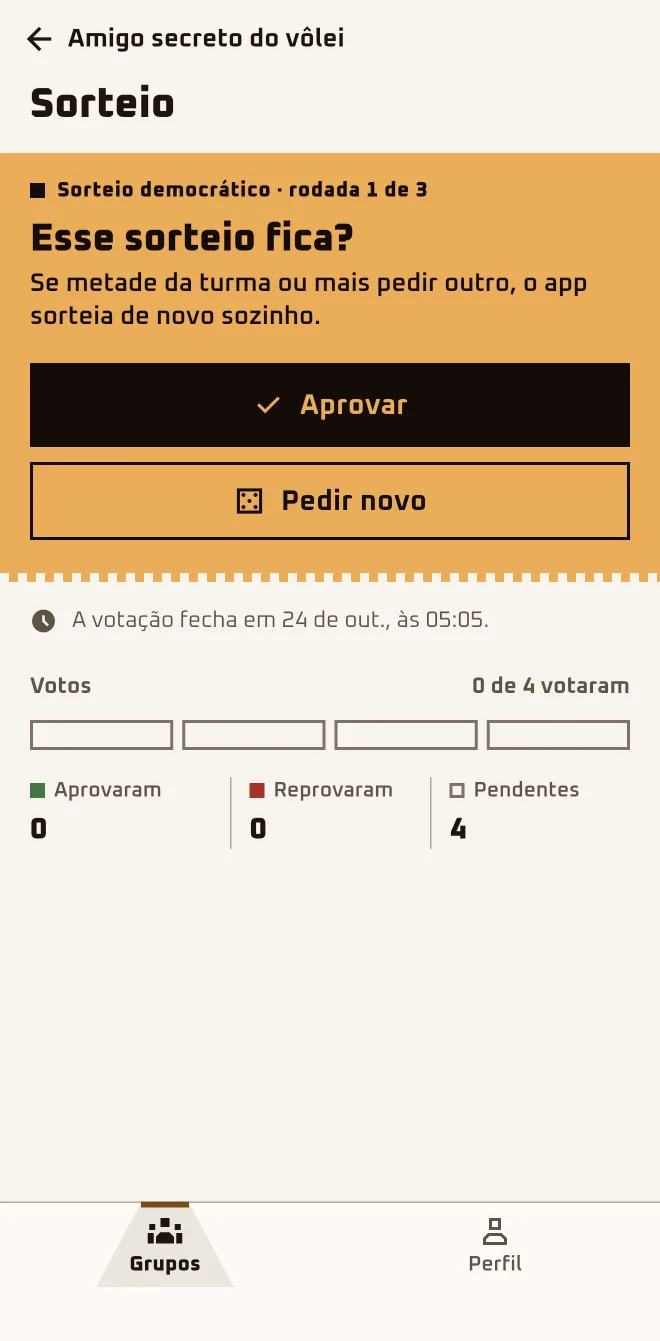
With "Democratic Draw" on, each participant with an account sees who they got and picks "Approve" or "Ask for a new one". The deadline is on screen.
The organizer sees no pairs till the reveal.
Only the organizer draws names, and only once. While the vote is open, nobody joins or leaves the group, and you can't run the draw again.
There are only 2 of us. Can we draw names?
Yes: the minimum is 2 approved people. The catch is that with 2, each one already knows who they drew, and the app says so: "There are 2 of you. Invite 1 more before the draw." With 3, it's a surprise. If you want to go ahead anyway, tap "Draw anyway", in "More in this group" › "Management".
Does the app draw names on its own on the set date?
No. The draw date is something you agree on with the crew; whoever organizes runs the draw, whenever they like. If the date goes by, the app shows "The draw date has passed" and you choose between "Draw now" and "Pick a new date".
I got an error: "has no valid draw options". What do I do?
A restriction blocked the draw: someone was left with nobody to draw. The app saved nothing. Go over the restrictions in "More in this group" › "Management" › "Restrictions", or invite more people, and tap "Draw names now" again.
No. You open your envelope in "See who I got", like any other participant, and see only who you drew. The pairs stay sealed until the reveal; until then, focus on yours: look at that person's wishlist.
I drew names and regret it. Can I redo it?
In a regular group, no: the app draws once. If "Democratic Draw" was on when you drew and more people vote "Ask for a new one" than "Approve", the app draws again on its own, for up to 3 rounds. Without it, the way out is to delete the group in "More options" › "Delete" and create another one from scratch.
How does the Democratic Draw vote work?
If more people ask for another than approve, a new draw is made; a tie keeps the draw. Voting closes when the whole group has voted or when the deadline passes (48 hours, with date and time on screen). There are at most 3 rounds: the third comes out ready and stands for good, with no vote.
I asked for a new draw and the old one stood. Why?
It was a tie, or more people approved than asked for a new one, or the deadline passed and whoever didn't vote didn't count. Each person votes once and can't change it, and anyone who takes part through a family member's account doesn't vote. Tap "See who I got" and head to that person's wishlist.
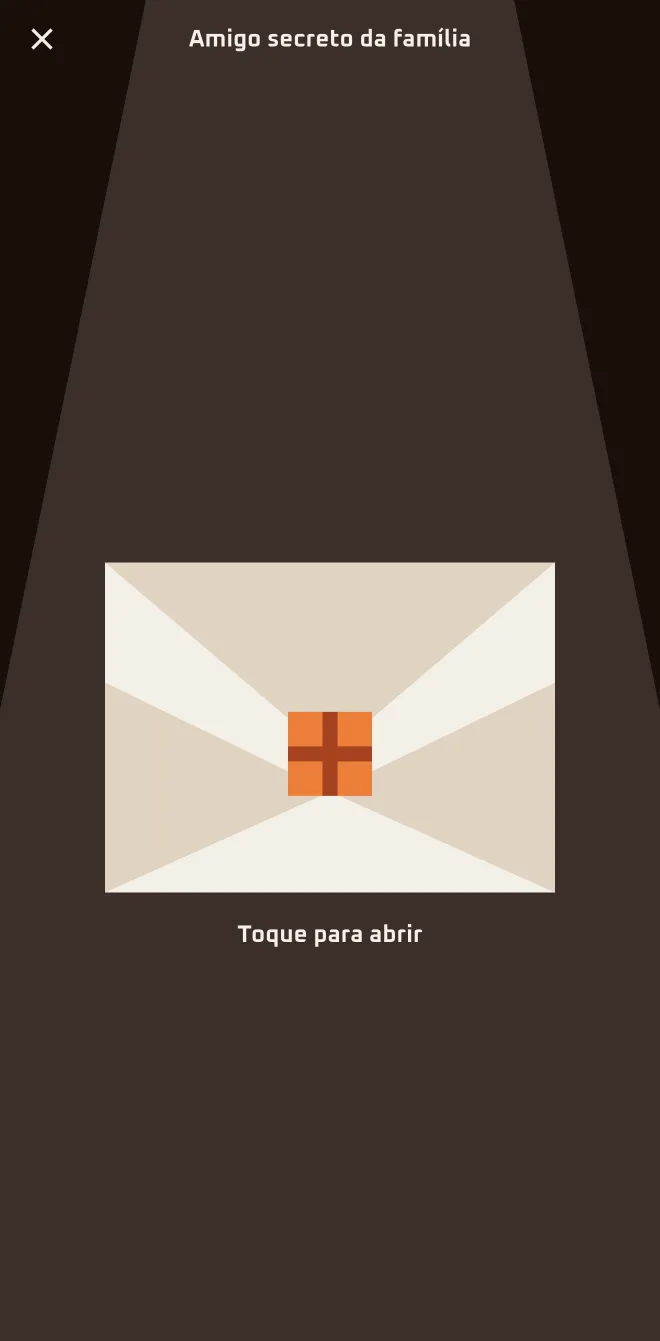
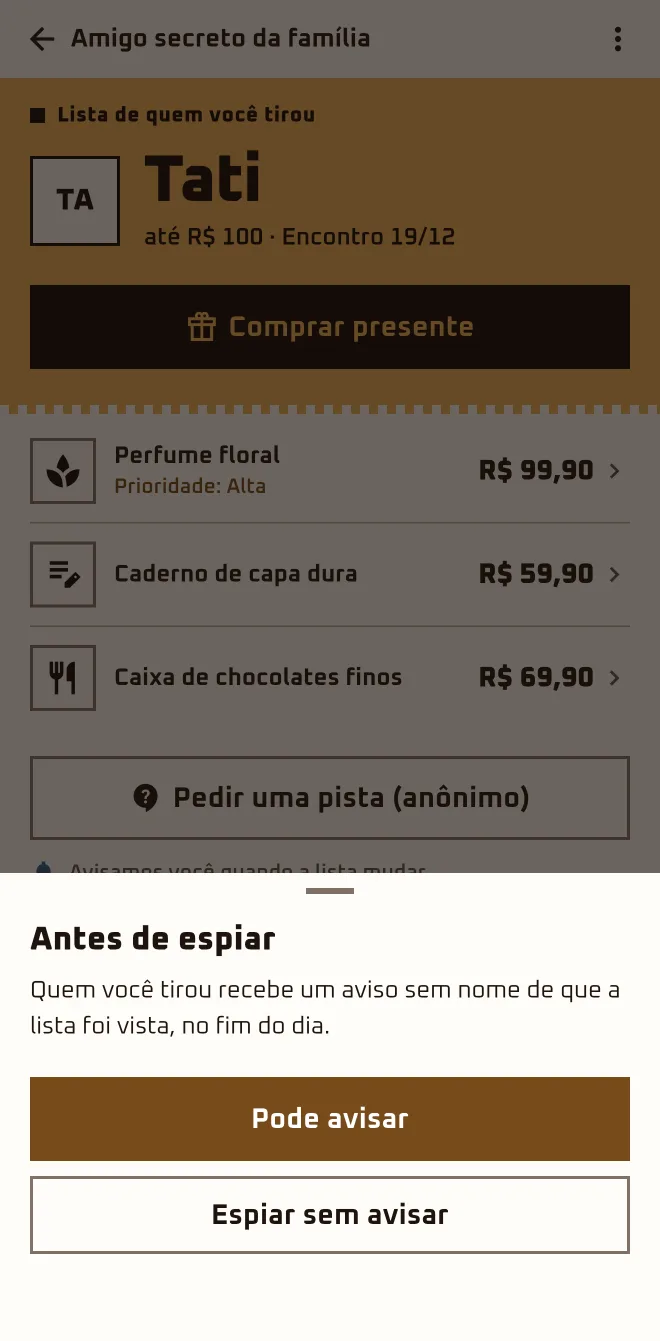
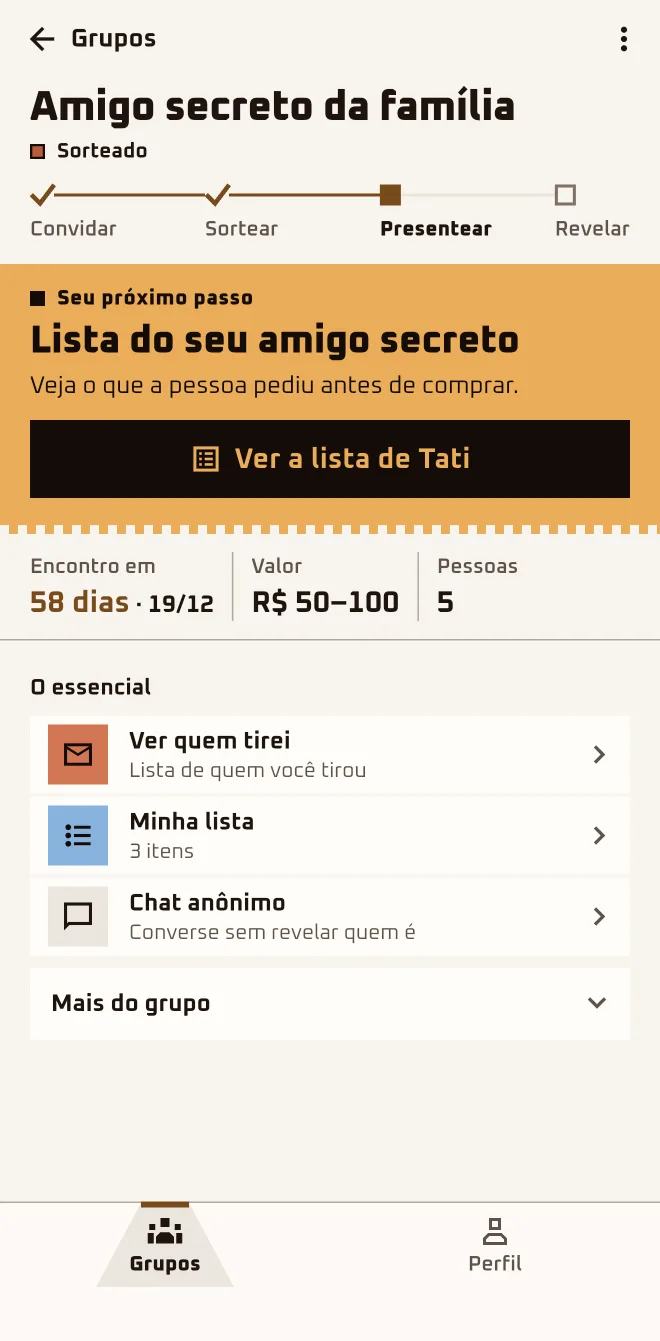
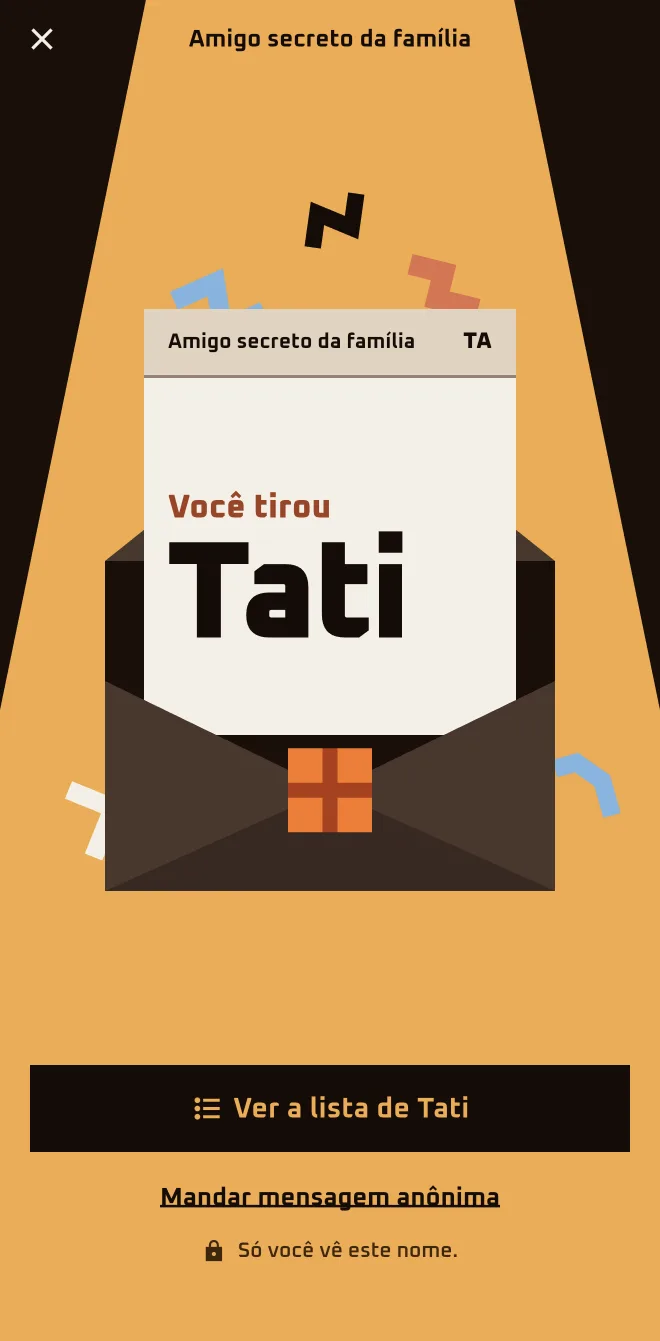
Tati opens the app, taps the envelope and reads "You got" with the name underneath: Dudu. "See Dudu's list" has three ideas, one marked high priority, and she breathes easy: the get-together isn't until December 19. Marina opened hers too, and only hers.
Screen 1App screen 2.6.4 · pt-BR
Screen 2App screen 2.6.4 · pt-BR
Screen 3App screen 2.6.4 · pt-BR
Sample group: Cousins. Made-up names.
I'm hereGroups›Names have been drawn›See who I got›Tap to open›See {name}'s list
I'm herethe group›The essentials›See who I got›Tap to open
In the browserplay.oamigosecreto.app›the group›See who you drew›Open in the app
1
Tap "See who I got"
On the group card, "Names have been drawn" comes with "See who I got". The envelope says "Tap to open" and shows "You got" with the name.
2
Open "See {name}'s list"
At the top, the agreed budget and the get-together date; the items are listed in priority order. "Buy a gift" takes you to the Store.
3
Empty list? Ask for a hint
"Ask for a clue (anonymous)" becomes the main button and opens the group's Hints. "Send an anonymous message" opens the anonymous chat.
4
In the browser? Open the app or the Store
"See who you drew" offers "Open in the app". Without installing anything, "Shop for the person I drew" opens the Store with the name and the list.
The envelope only shows the person you drew.
The organizer does not see the pairs before the reveal. After the draw nobody joins or leaves: "Remove from my list" only hides the group for you.
I opened the envelope and closed it. How do I see it again?
The envelope gives way to the list: "See who I got" stays under "The essentials" and opens straight to that person's list. On the group card, the next step becomes "Your secret friend's list", with the "See the list" button. Open the group, tap "See who I got" and the name is there.
I opened the envelope and got confused: did I draw this person, or did they draw me?
The envelope says "You got" and a name: that's the person you're giving a gift to. The person who drew you doesn't show up in the envelope or in the chat; in the chat, that person appears as "Your Secret Santa". Stick with the name in the envelope: tap "See {name}'s list" and see what that person asked for.
Does the organizer see who drew whom?
No. The person organizing opens their own envelope like any other participant and sees only who they drew; the organizer does not see the pairs before the reveal. If you're the organizer, do what the others do: tap "See who I got" and get going on your gift.
Does the person who drew me show up anywhere?
Not in the envelope or the chat: the person who drew you shows up as "Your Secret Santa". The screen "Who drew you?", under "More in this group" › "Mystery", unlocks hints. After the reveal, the "Gift Ranking" lists who gave and who received, if that game is turned on. Until then, collect the hints in "Mystery".
The person I drew has nothing on their list.
It happens, and the screen already tells you: "We'll let you know when the list changes." "Ask for a clue (anonymous)" opens the group's Hints. "Send an anonymous message", in the list menu or in the envelope, opens the chat with that person, with quick messages ready to go. Start with the anonymous message.
My kid joins through my account. How do they see who they drew?
In the group, the "{name}'s participation" section has "See who they drew" and "Hand the phone to {name}". That opens the "{name}'s turn" screen: you hand over the phone and your kid presses and holds "Hold to see" until the name shows up. Open the group, find "{name}'s participation" and hand over the phone.
I'm in the browser and the button only says "Open in the app".
The envelope lives in the app: "Open in the app" takes you to the download page. Without installing anything, tap "Shop for the person I drew": the Store opens with "You drew", the person's name, their list and gift suggestions. That link is good for 72 hours; if it expires, tap the button again and you get a new one.
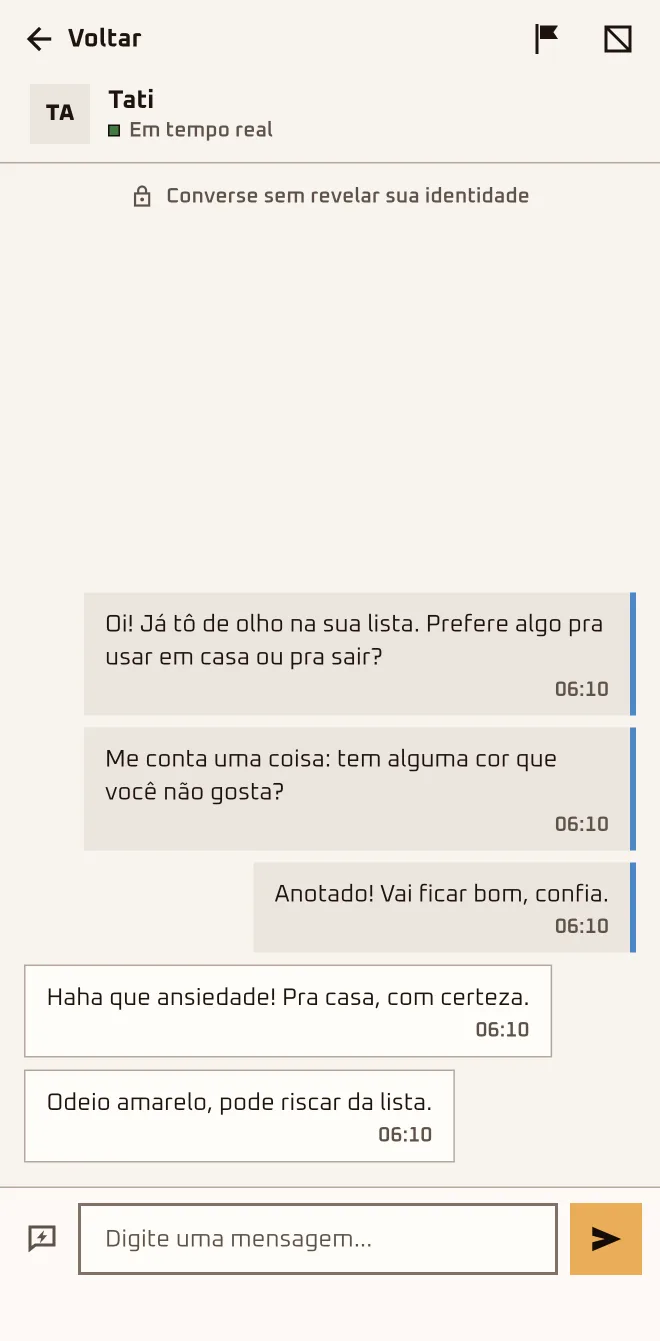
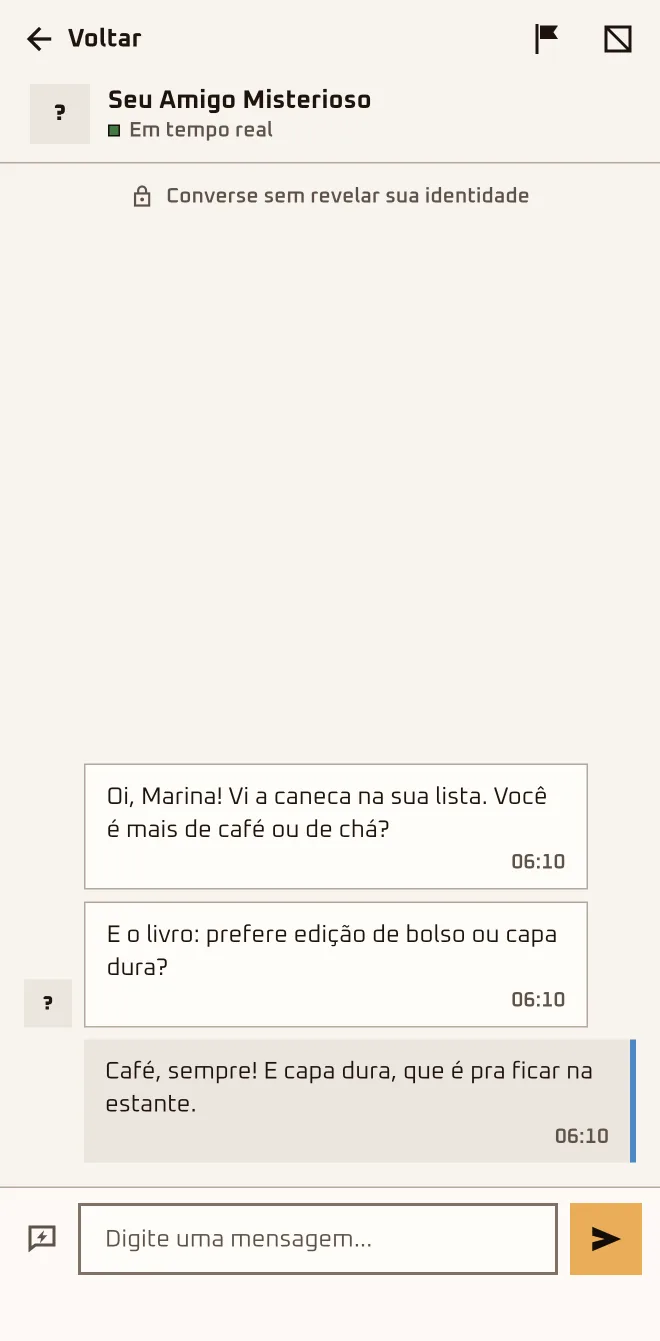
Dudu wants to know what shirt size the person he drew wears and sends the quick message "What's your clothing size?". On the other end, the question arrives signed "Your Secret Santa". Nobody has to guess.
Screen 1App screen 2.6.4 · pt-BR
Screen 2App screen 2.6.4 · pt-BR
Screen 3App screen 2.6.4 · pt-BR
Sample group: Cousins. Made-up names.
I'm herethe group›Anonymous chat›Anonymous chats›Chat with Match / Chat with who drew you
I'm herethe group›More in this group›Hints›Leave a hint
I'm hereGroups›Chats
1
Tap "Anonymous chat"
This opens "Anonymous chats": "Chat with Match" is for who you drew; in "Chat with who drew you" the messages arrive signed "Your Secret Santa".
2
Pick a quick message or write your own
Tap "Show quick messages" to grab one or type your own. The app makes you wait 30 seconds between messages, and moderation stops offensive text.
3
Leave a hint for the group
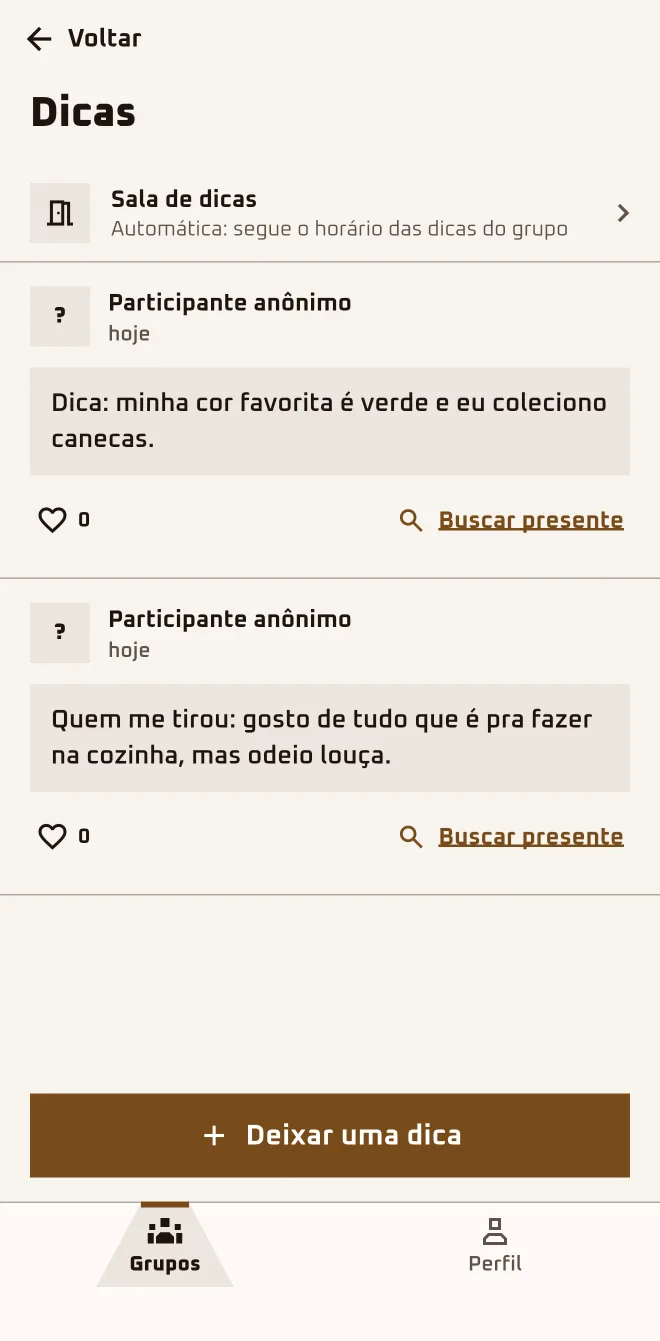
Under "More in this group" › "Hints" › "Leave a hint", the hint goes on the board as "Anonymous participant" for the whole group. Likes carry no name.
4
Crossed a line? Press and hold the message
On a received message: "Report message" or "Block Your Secret Santa". You can block whoever drew you without knowing who; the app doesn't tell them.
The chat opens after the draw and runs in real time with the conversation open. Away from it, the sign is the new-message dot in "Chats" and on the group card: a new message doesn't send a notification to your phone.
I sent a message and the person didn't reply. Did they get it?
It depends where the person is: with the chat open they see it at once; with the app closed, nothing alerts them, and the reply comes when they're back. On your end, if the header says "Offline", the message waits in a banner: "Message not sent. It will go out as soon as you're back online." To hurry it, tap "Try now".
Do I get a notification when a message comes in?
No. An anonymous chat message doesn't show up as a notification on your phone. With the app open on another screen, the "Chats" bubble at the top and the group card get a new-message dot. After the draw, open the app every so often and tap "Chats".
Can I find out who drew me through the chat?
Not in the chat. In "Chat with who drew you" the person shows up as "Your Secret Santa", no name, no photo, even after the reveal. In a group of 2 each one knows who drew them, and with 3 you can work it out; outside the app, nothing stops someone from telling. Reply there and save the mystery for the get-together.
Are a hint and a message the same thing?
No. A message goes through the anonymous chat, one-on-one: you and the person you drew, or you and the person who drew you. A hint goes to the whole group's "Hints" board (some screens say clue). To talk to one person, tap "Anonymous chat"; to put a hint out, go to "More in this group" › "Hints" › "Leave a hint".
Why do I have to wait 30 seconds?
The chat makes you wait between messages: right now it's 30 seconds, and if you try sooner the app tells you how many seconds are left. The quick messages skip text moderation but follow the same wait. Put everything you want to say into one message and send it at once.
I got a nasty message. What do I do?
Press and hold the message you received and pick "Report message" or "Block Your Secret Santa" (in the other chat, "Block" plus the name). The report goes to the team with the message attached; blocking cuts off that chat. You can undo it under Profile › "Blocked people". If it's serious, do both: report and block.
Can we chat before the draw?
Not the chat. Before the draw, tapping "Anonymous chat" only shows "The anonymous chat opens after the draw." Hints, though, are already open: any approved participant can leave one under "More in this group" › "Hints" and the whole group reads it. To warm up the crew, tap "Leave a hint" and drop one about yourself.
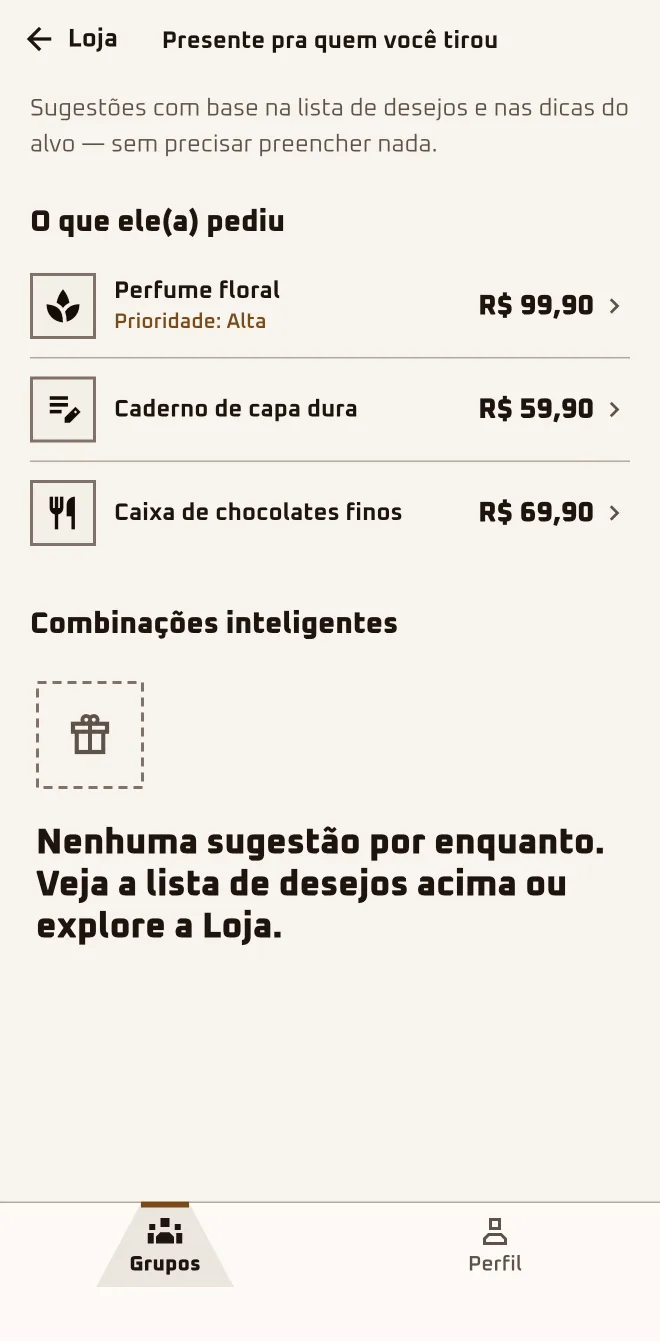
Tati taps "See Dudu's list" and "Buy a gift". The Store shows what Dudu asked for, and every product says if it fits the agreed budget, up to R$ 100. She picks a pair of headphones, taps "Buy a gift for Dudu" and finishes the purchase at the partner store.
Screen 1App screen 2.6.4 · pt-BR
Screen 2App screen 2.6.4 · pt-BR
Sample group: Cousins. Made-up names.
I'm hereGroups›the group›See who I got›Buy a gift
I'm hereGroups›the group›More in this group›Buy a gift
I'm hereStore tab
In the browserplay.oamigosecreto.app›the group›Shop for the person I drew›store.oamigosecreto.app
1
Open the list of the person you drew
Tap "See who I got" and, at the top of the list, "Buy a gift". The screen brings together "What they asked for" and "Smart matches".
2
Dig around in the Store tab
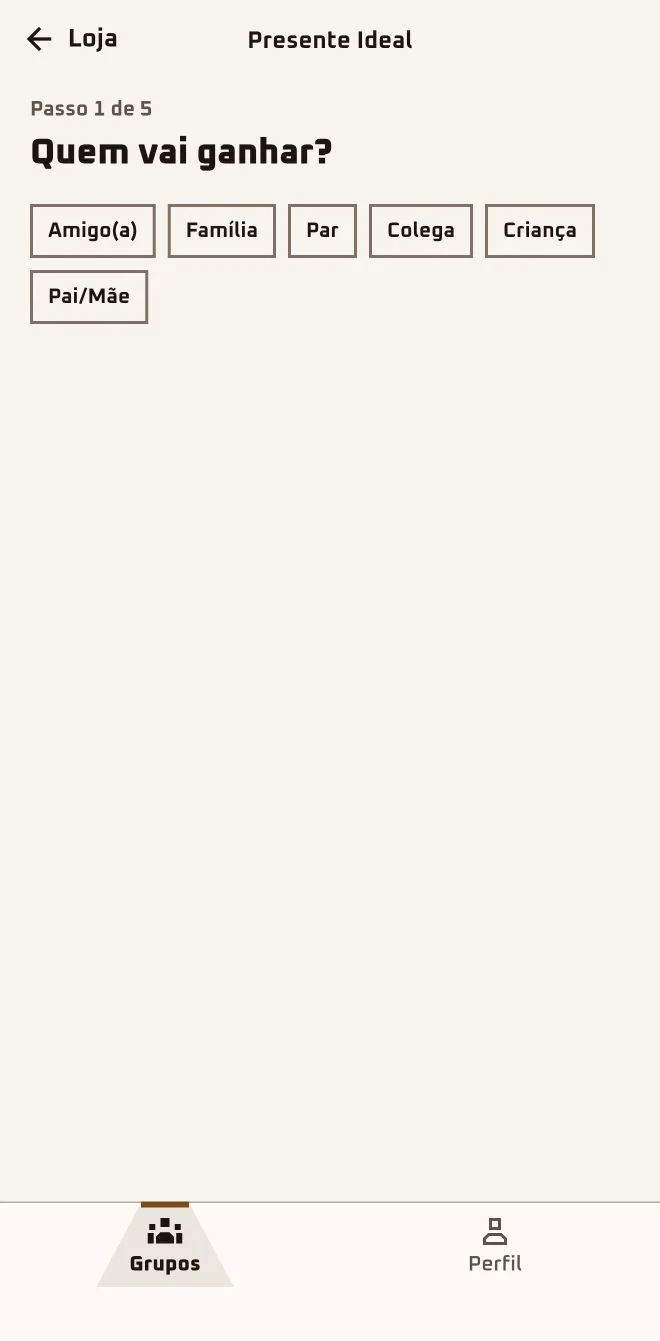
The "Store" tab has search, "Discover", "Perfect Gift" and "Collections" for when the list is empty or you want more ideas.
3
Tap the buy button
Once you've drawn someone, the button says "Buy a gift for {name}". The app says "You'll finish checking out at {store}." and opens the partner store.
4
Favorite it or put it on your list
Tap "Favorite" to keep the product in "Favorites". "Add to my list" puts the product on your wishlist, with photo and link.
You finish the purchase at the store.
The Store carries products from Brazilian stores. Anyone 13 to 17 sees the Store and the list of the person they drew, but two things are adult-only: the "Find a gift" button on each hint and the price-drop alert.
Do I have to buy through the Store?
No. The Store is a shortcut, and the gift can come from wherever you like. The list of the person you drew shows what they asked for, and one tap on an item with a link opens the store. Open the group and tap "See who I got".
Does the Store sell the products itself? Do I pay in the app?
No, on both counts. The Store gathers products from partner stores, and the app neither sells nor takes payment. It may earn a commission, and your payment details don't go through the app. Tap "Buy a gift for {name}": the app says "You'll finish checking out at {store}." and opens the partner store, where you pay.
Is the Store price the same as in the actual store?
Not always. The price shown in the Store is what the partner store reported at the last check, and the one that counts is the price at checkout. If the same product has more than one offer, the "Compare offers" section lists each store and marks the "Best price". Before paying, check the amount at the partner store.
I'm outside Brazil. What about the Store?
Today the Store shows products from Brazilian stores, priced in reais, whatever country your account is in. Is the person you drew in Brazil? The Store works just the same. If the whole crew is abroad, use the wishlist and the anonymous chat to settle on the gift, and buy wherever works best for you.
How do I know if it fits the agreed budget?
Once you've drawn someone, every product you open says "Fits the group budget" or "{x} over the group budget". In search, "Filters" has "Max price". Open the product and check the tag before tapping "Buy a gift for {name}".
I'm in the browser. Does the Store work?
It does. At play.oamigosecreto.app, a group with names drawn has the "Shop for the person I drew" button: it opens the Store in another tab, already with the name of the person you drew. The link is good for 72 hours; if it expires, just tap again. Open the group in the browser and tap "Shop for the person I drew".
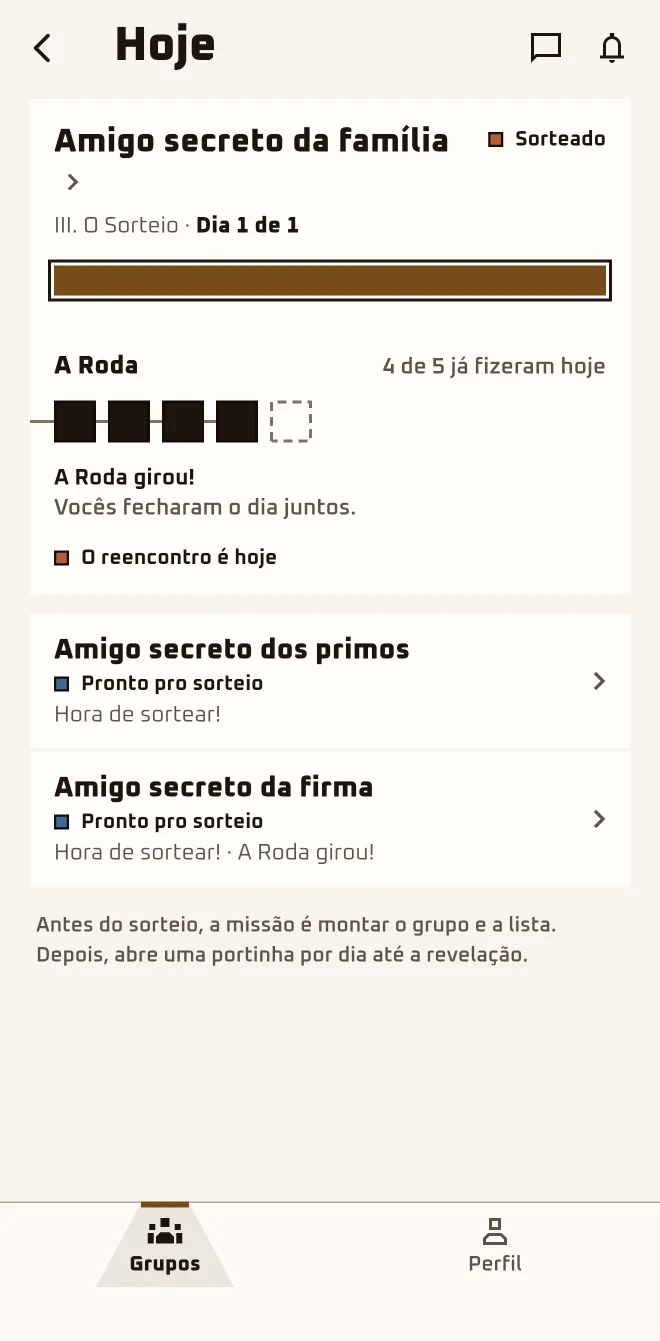
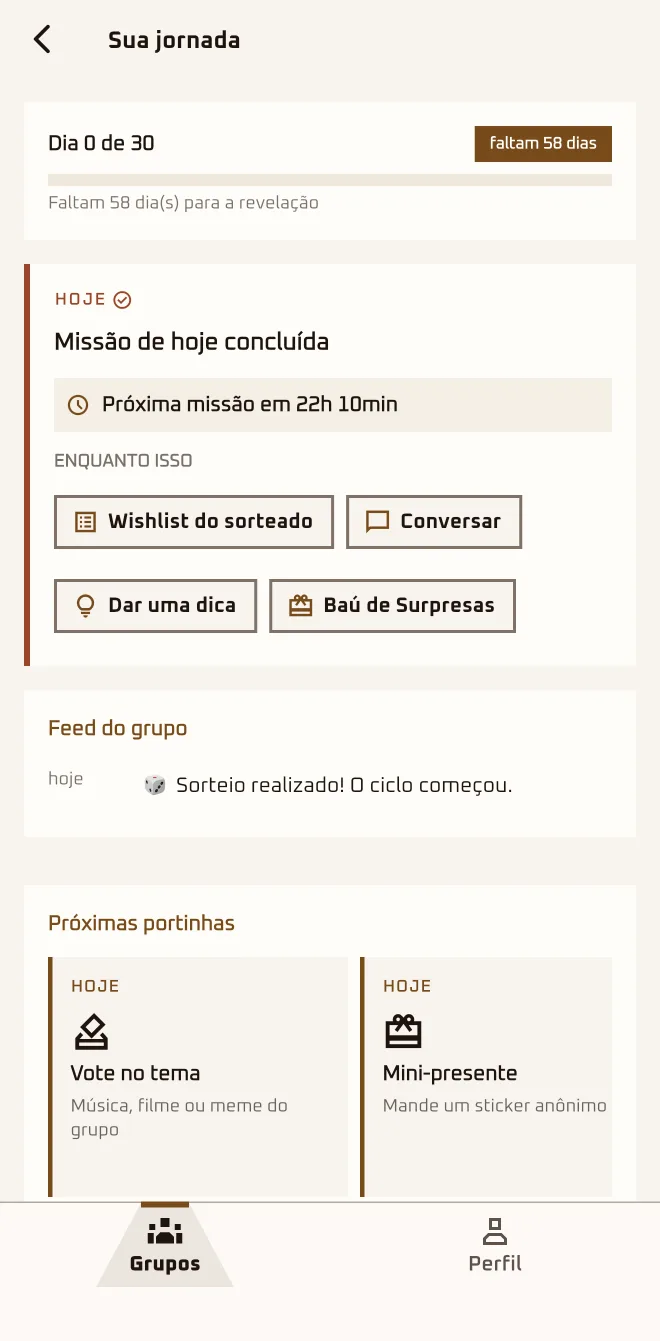
The get-together is 14 days away and, every morning at 9, a door opens: today it's "Rhyming hint". The Cousins' Flame is at 6 days. Marina has built her wishlist and, from the Today tab, sends an anonymous nudge to whoever hasn't yet.
I'm herethe group›More in this group›Surprise Chest · Mystery · Fun
1
Open today's door
On the "Today" tab, tap "Open" on the "Open today's mission" card. The day's box says "Tap the box to open".
2
Do the mission
It can be "Confession", "Detective Mode" or "Rhyming hint". If "Doesn't fit? Swap this mission" shows up, tap it and the app swaps in another one.
3
Nudge the group
Anyone who has built their wishlist sees the "Nudge the group" button, which sends an anonymous notification to whoever hasn't, once a day.
4
Peek at the Chest and the Mystery
The "Surprise Chest" keeps what the person who drew you sent, without saying who. The "Mystery" releases a new clue every 3 group actions.
5
Play with the group
Under "Fun" you find the themes ("Suggest Themes"), the "Group Quiz" and the "Photo Wall". The "Gift Ranking" only opens after the reveal.
One door a day until the get-together.
None of the games are required. The Flame belongs to the group: it lights up when anyone in the group does something that day, there's one grace day, and it never says who skipped.
What is today's door?
It's the mission of the day, inside the "30 Magic Days" journey. The app creates the doors at the draw: from 3 to 30, each one opening at 9 a.m. Brasília time. Tomorrow's doesn't open early, and the journey only exists in the app: it doesn't show up in the browser. Open the group and tap "Open today's mission".
What is the Today tab for?
It's the day's overview of your groups after the draw. It shows each group's journey day and today's mission, with the "Open" button. There's also the Circle, which counts how many have a wishlist without saying who, and the countdown to the get-together (or the reveal time, if set). Tap "Today" in the bottom bar.
I don't want to play. Do I have to?
No. The doors, the Chest, the Mystery and the games are on in a new group, but skipping a day has no penalty: the Flame and the Circle never say who played and who skipped. The Secret Santa carries on, with wishlist, chat and envelope. If you prefer, open the group just for your list and the list of who you got.
What is the group's Flame?
It's the group's streak of active days: one person acting that day is enough to light it. Before the draw there's the pre-draw Flame, only in groups with 3 or more accounts; at the draw the streak goes back to zero and the record stays. To keep it lit, do today's mission; if you can't, anyone in the group will do.
Do the Mystery or Detective Mode tell me who drew me?
No. The "Mystery" drops ambiguous clues about who drew you. "Detective Mode" is the guessing door: you record who you think drew you, and "Your guess stays secret until the reveal." To make your guess, wait for the "Detective Mode" door to show up in the journey.
How do I go up a rank?
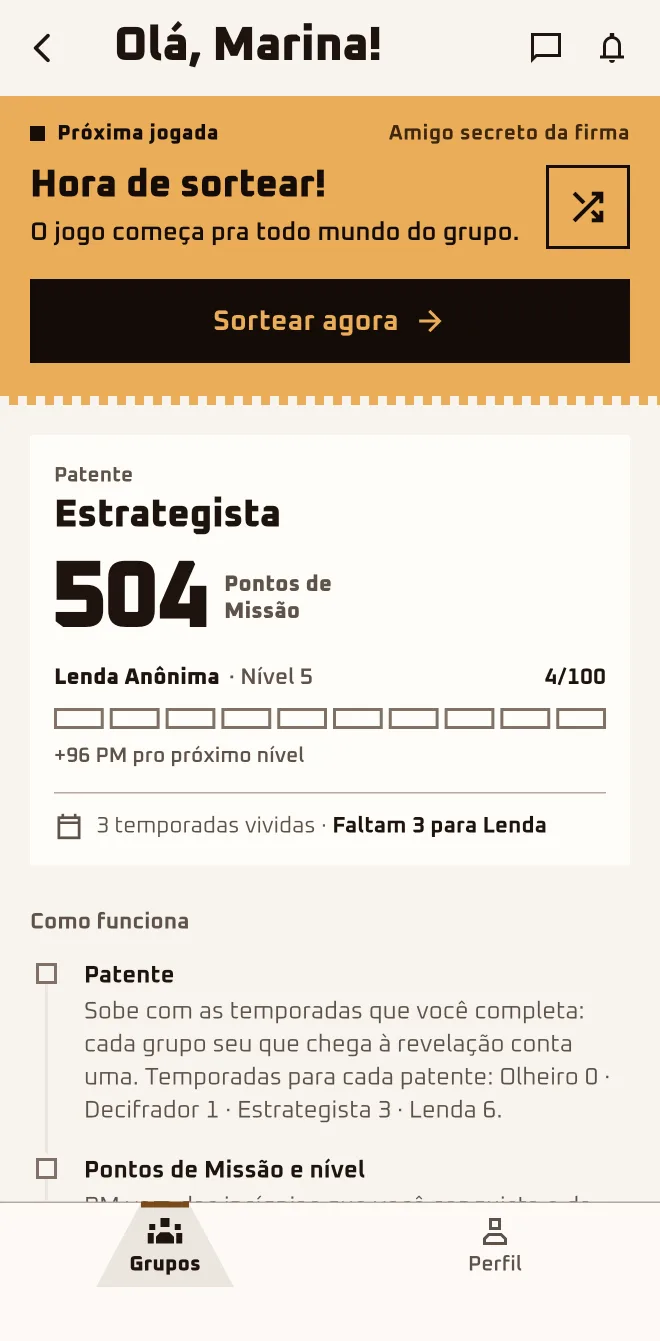
By completing seasons: each group of yours that reaches the reveal counts as one. The ladder is Olheiro (0 seasons), Decifrador (1), Estrategista (3) and Lenda (6), shown in Portuguese even in English. "Mission Points" are a separate count: every 100 points you go up a level. See "Home" › "How it works".
I extended the get-together date. What about the journey?
The journey grows along with it: the app creates new doors up to the new date, one a day. After the draw, the get-together date can only be extended, never shortened, and the draw date is locked. Only the organizer can do it: open "More options" › "Edit" and change "Event Date", the form's name for the get-together.
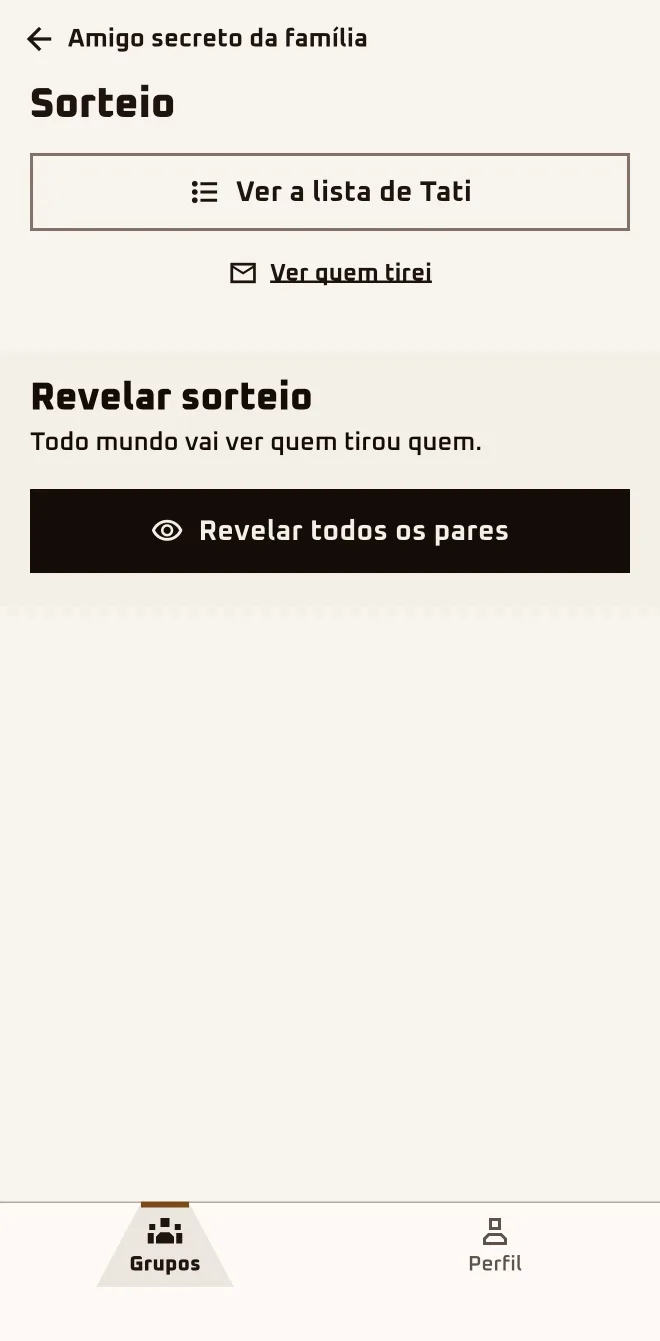
December 19, at Grandma's house: in Marina's app, the next step for the day reads "Party day is here". At the gift swap, each person says who they drew. At the end of the night she taps "Reveal now", then "Reveal all pairs".
Screen 1App screen 2.6.4 · pt-BR
Screen 2App screen 2.6.4 · pt-BR
Screen 3App screen 2.6.4 · pt-BR
Sample group: Cousins. Made-up names.
I'm herethe group›Set the reveal time
I'm herethe group›The reveal is today›Enter the room
I'm herethe group›Party day is here›Reveal now›Reveal all pairs
In the browserplay.oamigosecreto.app›the group›The reveal is today›Open in the app
1
Set the reveal time, if you want
The organizer can "Set the reveal time" from 5 minutes to 60 days out. On the day, "Enter the room" opens a single countdown for the whole group.
2
Reveal the pairs
The organizer taps "Reveal now", then "Reveal all pairs". There's no undo, and everyone but the organizer gets the notification.
3
Nobody revealed? Wait 2 days
2 days after the get-together, the app closes the cycle on its own, with no notification, and the group is "Revealed". The first sign is the recap.
4
See what opens afterwards
With the game turned on, the "Gift Ranking" shows "Gift from {name}". Once the recap is ready, the group becomes a chapter in "Your memories".
5
Run it again with the same crew
In Profile › "My extras" › "Your memories", open the chapter and tap "RUN THIS GROUP AGAIN". Send the new group's link on WhatsApp.
The organizer reveals. The Room counts down.
The get-together is swap day; revealing who drew whom is a separate step that belongs to the organizer: "Reveal now", then "Reveal all pairs". If nobody does anything, the app closes the group on its own 2 days later.
I set the reveal time. Does the app tell the crew and reveal on its own when the time comes?
No, and the message ("Reveal scheduled. We'll let everyone know.") promises more than happens. Scheduling only saves the date and time; the organizer is still the one who reveals, through the "Reveal now" link in "The reveal is today". Agree on a time on WhatsApp and tap the link before the countdown hits zero.
The countdown hit zero and nothing happened.
That's how it works: at zero, the Room sends you back to the group, which stays "Drawn" until the organizer reveals. Once the time has passed, the "Reveal now" link disappears and the "Set the reveal time" card comes back. If you're the organizer, set it again, at least 5 minutes ahead, and tap the "Reveal now" link.
I forgot to reveal. Now what?
It's fine: 2 days after the get-together the app closes the cycle on its own, with no notification, and the group is "Revealed". The first sign is the notification "Your group's recap is ready". If you're the organizer and can't wait, open the group: "Party day is here" shows "Reveal now", then "Reveal all pairs".
After the reveal, where do I see who got whom?
There's no screen with every pair: the crew finds out who got whom at the swap. The "Gift Ranking" shows "Gift from {name}", as long as the game is turned on. The chat with the person who drew you stays "Your Secret Santa". Open "More in this group" › "Fun" › "Gift Ranking" and vote.
I want to reveal before the party. Can I?
Yes, if you're the organizer, and there's no undo. The one time it's off the table is during a Democratic Draw vote. Set the reveal time for today in "Set the reveal time", at least 5 minutes ahead, and tap the "Reveal now" link in the step "The reveal is today": it opens the Draw screen with "Reveal all pairs".
When does the recap arrive?
After the group is marked "Revealed", whether the organizer revealed or the app closed it on its own. The app builds the slides in the background and lets you know with "Your group's recap is ready"; there's no guaranteed time. If the notification doesn't come, open the group and tap "Watch the recap" now and then.
Can we run it again with the same crew? Do people get notified?
Yes, and not just the owner: anyone who took part can run it again, once each, after the recap is ready. In "Your memories", open the chapter and tap "RUN THIS GROUP AGAIN". Anyone from the group sees the "Invited" badge and gets in without approval; the app sends no notification. Send the new group's link on WhatsApp.
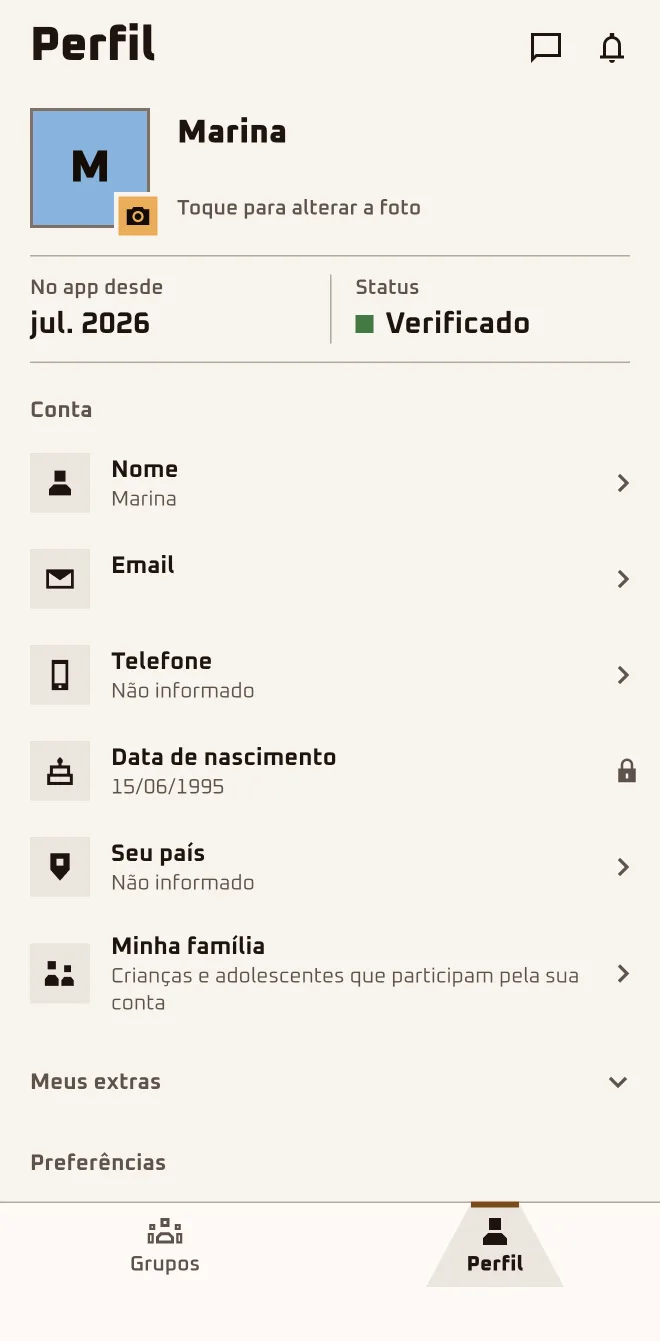
Marina left on only the notifications that matter and set her country so the currency comes out right. She didn't touch her email: it's her Google one and it doesn't change. All of it lives under the Profile tab, the last one on the bar.
Screen 1App screen 2.6.4 · pt-BR
Screen 2App screen 2.6.4 · pt-BR
Screen 3App screen 2.6.4 · pt-BR
Sample group: Cousins. Made-up names.
I'm hereProfile›Account›Name · Email · Phone · Your country · My family
I'm hereProfile›Preferences›Notifications · Sound & vibration · Language · Appearance · Blocked people
I'm hereProfile›Help›Talk to us · Download my data · Delete Account
In the browserplay.oamigosecreto.app›Profile›Emails · Logout
1
Turn on only the notifications that matter
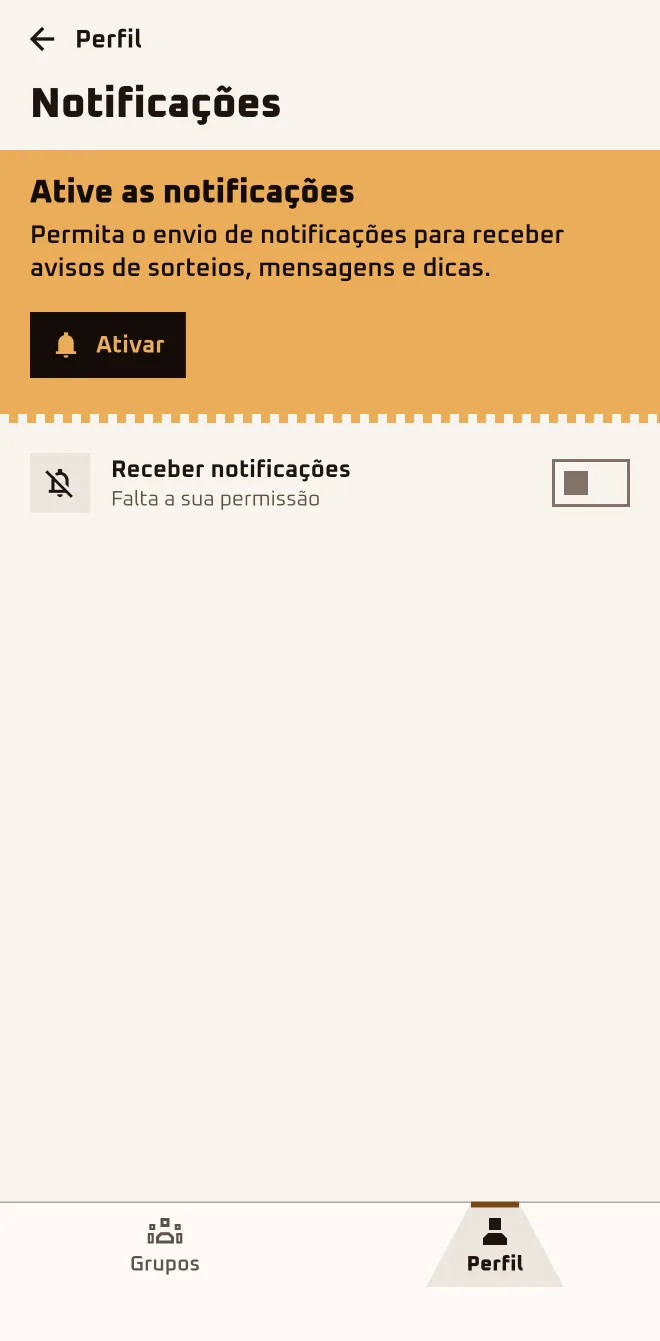
In Preferences › "Notifications", "Receive notifications" is the master switch; each kind has its own. If the system blocked it, tap "Open Settings".
2
Set language, appearance and country
In "Language" you pick a language; in "Appearance", "Light" or "Dark". In Account › "Your country", the country sets the group's suggested currency.
3
Register your family
Under "My family" › "Add someone", only the "Nickname" goes in, up to 5 per account. In the group, before the draw, tap "Add a family member".
4
Sign out without leaving the group
"Sign out" only ends your session. Leaving a group lives under "More in this group": "Leave group" before the draw, "Remove from my list" after it.
5
Delete the account, if it comes to that
Help › "Delete Account" erases everything. If you own a group with another approved person, first tap "Hand the group over to {name}" in "People".
Notifications the app sends: draw, vote, reveal, requests and approvals in the group, the list of who you got, hints, team messages and news. A message in the anonymous chat sends no notification: Chats just flags it.
I'm not getting any notifications.
A message in the anonymous chat sends no notification: it gets flagged on the "Chats" bubble. In the app, under Profile › Preferences › "Notifications", "Receive notifications" has to be on and not showing "Waiting for your permission". If you see "Notifications blocked in system settings", tap "Open Settings".
Which notifications does the app send?
The draw, the vote, the reveal, requests and approvals in the group, the list of who you got, hints, the day's door, the recap and team messages. Nudges about the group sit behind the "Group activity" switch; news, behind "Promos and news". Turn off what you don't want under Profile › Preferences › "Notifications".
I want to change my account email.
Today, sign-in is Google or Apple only, and the account email is the one you signed in with: under Profile › Account, the "Email" field has a padlock and can't be changed. Changing your Google or Apple email doesn't change the one in the app. If you still need to, write to the team under Profile › Help › "Talk to us".
How do I block someone? Do they find out?
You can block in "People" (their menu › "Block") or by long-pressing a message in the anonymous chat, without knowing who it is. The person isn't notified. Their chat and Surprise Chest messages go quiet; hints and shared items keep showing up. To undo it: Profile › Preferences › "Blocked people" › "Unblock".
How do I reach the team?
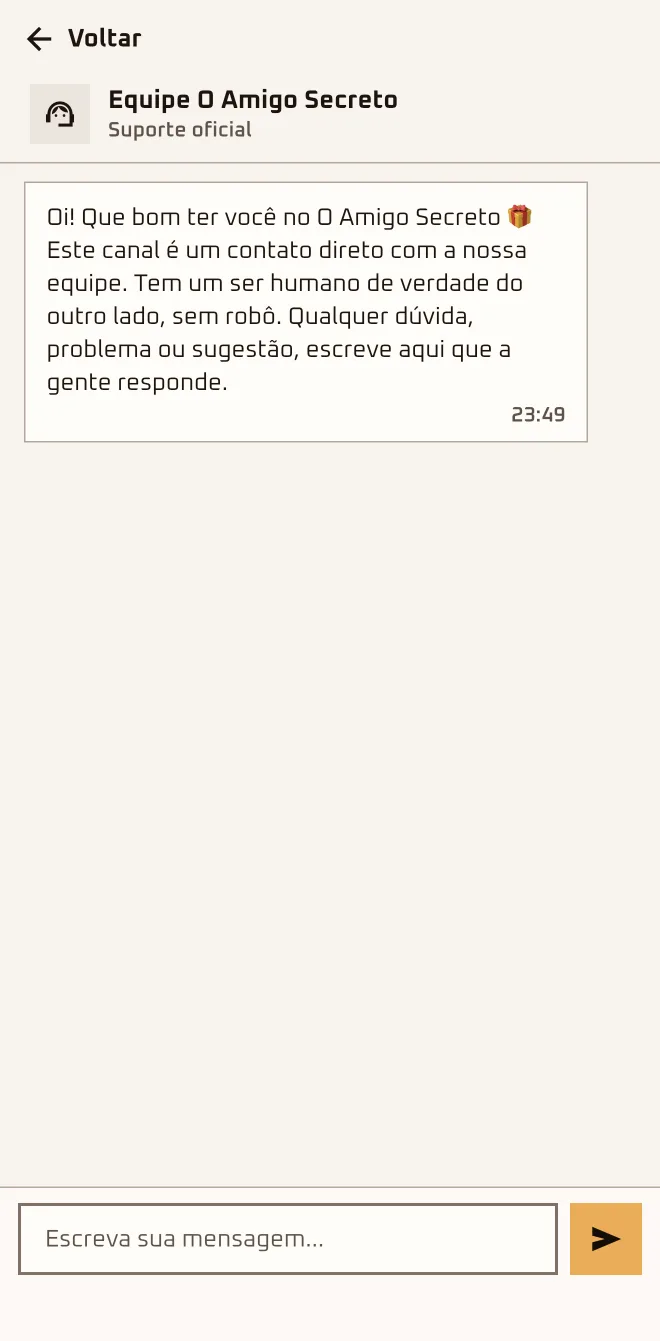
In the app, Profile › Help › "Talk to us" is a chat with real people; the reply lands in the same conversation. Before the first reply you can send up to 3 messages in a row; after that, one at a time. A link, a Pix key or an @ before that reply may get flagged as spam. Give the group's name and say what happened.
I got a new phone. Do I lose my groups?
No: your groups stay in your account. On the new phone, install the app and sign in with the same Google or Apple account. If the old account was email and password, sign in with Google or Apple on that same email: the app merges the two on its own. All the new phone asks again is notification permission; just say yes.
How do I download my data?
Under Profile › Help, tap "Download my data": the app generates a JSON copy and opens the share sheet so you can save it wherever you like. Downloading deletes nothing; deleting the account is a different button, "Delete Account", in the same section. The copy is good for 24 hours; once that's past, generate another.
Bruno doesn't install anything on his phone, on principle. He joined through the browser, built his wishlist and voted on the draw. For the envelope, the chat and the phone notifications, he ended up downloading the app.
I'm hereoamigosecreto.app (the website: invite, invite kit, name draw and this guide)
I'm hereplay.oamigosecreto.app (the browser)
I'm herestore.oamigosecreto.app (the Store)
I'm hereApp Store and Google Play (the app)
I'm hereoamigosecreto.app/baixar (to pick one)
Browser or app?
App
Browser
Join through the invite
Yes
Yes
Create the group and invite
Yes
Yes
Approve and draw names
Yes
Yes
Vote in the Democratic Draw
Yes
Yes
Wishlist
Yes
Yes
Envelope
Yes
through the vote or the Store
Anonymous chat and hints
Yes
No
Restrictions and My family
Yes
No
Waiting Room and reveal
Yes
No
Recap and running the group again
Yes
No
Phone notifications
Yes
by email, if you turn it on
Store
Yes
"Shop for the person I drew" and store.oamigosecreto.app
Websiteoamigosecreto.app
Browserplay.oamigosecreto.app
Storestore.oamigosecreto.app
Get the appoamigosecreto.app/baixar
1
Use the same account in both
In the app and in the browser you sign in with the same Google or Apple account, no password. Your groups and your wishlist show up in both places.
2
Do the essentials in the browser
At play.oamigosecreto.app you join by invite, create the group, invite people, approve whoever asked, build your wishlist, draw names and vote.
3
Install the app for the rest
The envelope, chat, hints and notifications stay in the app. In the browser, when the next step is one of those, the panel shows "Open in the app".
4
Just drawing names? Open the name draw
With the crew in the room and no account needed, open oamigosecreto.app/sorteador: 3 to 100 names, with restrictions. Nothing leaves your browser.
5
Pick how to install
On iPhone it's the App Store, on Android it's Google Play, and if you stay in the browser you add the page to your home screen from its menu.
Works in your browser, nothing to install. Drawing names with no sign-up only applies to the site's name draw: a group needs a Google or Apple account, in the app or in the browser.
Do I need to install anything?
No. At play.oamigosecreto.app you join by invite, create the group, bring the crew in, approve whoever asked, build your wishlist, draw names and vote. If you got an invite, tap the link: on your phone, the big button says "Join now, no download needed". Without an invite, open play.oamigosecreto.app and sign in.
What can I only do in the app?
The app is where you find the anonymous chat and the hints, My family, the photo album, the Waiting Room, the 30 Magic Days doors and the group games. The envelope is in the app too, but "Shop for the person I drew" opens the Store with the person you drew. Install it from the App Store or Google Play.
Is there a desktop version?
Yes, in the browser: play.oamigosecreto.app opens on a computer with the same account and the same groups, and an invite opened there shows the "Join in the browser" button. The app itself is only for iPhone and Android. Open play.oamigosecreto.app and sign in with your Google or Apple account.
I just want to draw names now, without creating an account.
That's what the site's name draw is for, at oamigosecreto.app/sorteador, no sign-up. The phone goes from hand to hand and each person taps their own name. Whoever is holding the phone can peek; if even you shouldn't know who drew whom, create a group instead. Open the name draw, paste the names and tap "Draw names".
How do I install it on iPhone and Android?
On iPhone, from the App Store; on Android, from Google Play. The page oamigosecreto.app/baixar shows "Download for iPhone", "Download for Android" and "Open in the browser (no install)" and, if you came from an invite, keeps the code in view. If the app opens with "Update required", update it in the store and go on.
I started in the browser. Do I lose anything if I install the app?
You don't lose a thing. The account is the same, Google or Apple, and your groups, your wishlist and everything you've done live in that account, not on the device. Install it, sign in with the same Google or Apple account and the group is already there, now with the envelope, chat, hints and phone notifications.
Do I get notifications in the browser?
On your phone, no: the browser doesn't send any. What you get is an email when someone joins or the draw is scheduled. To turn it on, go to Profile, find the "Emails" card and check "Activity in your groups". To hear when the draw runs or you're approved, install the app and turn on "Notifications" in Profile.
Things that really happen, and what you can do about them today. Before the draw, almost everything can be undone; after it, not much.
Only draw names once the crew is complete. Before the draw, people can leave and be removed; after it, they can't.
I didn't get the draw notification.
Phone notifications only arrive with the app installed and permission turned on; the browser sends none. Check under Profile › Preferences › "Notifications" that "Receive notifications" is on; if the system blocked them, tap "Open Settings" and allow them. Notification or not, open the group and tap "See who I got".
You're "Waiting": you asked to join and the organizer hasn't let you in yet; if the draw happens before you're let in, you're left out. While you wait, tap "Start my wishlist" and "Remind the owner". If it's taking a while, reach out to them outside the app; a WhatsApp message will do.
It happens. If you're still "Waiting", tap "Leave". If you've already been let in and names haven't been drawn yet, open the group, go to "More in this group" and tap "Leave group". Then just join the right group with the code or the link you were sent.
Ask for it again: the organizer can find the code and the QR code under "Code and QR", and anyone already let in can send you their own link. If the owner used "Change invite code", the old link no longer works. With the code in hand, go to Groups › "New group" › "I have a code" and tap "Join Group".
Only the organizer approves and runs the draw. If names have been drawn and only the reveal is left, the app closes the cycle by itself 2 days after the get-together. Before the draw, anyone "Waiting" can tap "Remind the owner"; if they still don't come back, create another group with the crew and send the new link.
After the draw nobody leaves the group. If the group is just getting started, the organizer can delete it under "More options" › "Delete" and create another with only those who stayed. If the crew would rather keep going, work it out outside the app: whoever drew the person who left gifts the person they had drawn.
They can't: after the draw the group closes, and not even the organizer can let someone in. Create a new group with whoever was missing. Or, after the reveal, once the recap is ready, tap "RUN THIS GROUP AGAIN" under Profile › "My extras" › "Your memories"; whoever was missing joins through the new group's link.
That's on purpose. Once the draw starts, including while the Democratic Draw vote is open, nobody leaves or gets removed. Before the draw the way out is "Leave group", under "More in this group"; the organizer uses "Remove from group", under "People". After the draw, the only option is "Remove from my list".
With the rules about who can't draw whom, someone was left with nobody to draw and the draw got stuck; nothing was saved. Review them under "More in this group" › "Management" › "Restrictions" and delete the rule that got it stuck, or bring in more people. Then tap "Draw names now" again.
The draw stands when there's a tie, when more people approve than ask for a new one, or when the deadline passes and the people who didn't vote aren't counted. If it was the third round, there's no vote at all: that result is final. The result is the one you already saw: open the group and tap "See who I got".
The anonymous chat doesn't send any notification outside the conversation: the other person only sees the new-message dot on the "Chats" bubble when they open the app. It's worth trying again in the chat later or leaving a hint for the whole group: tap "Hints" and then "Leave a hint"; that one does notify the crew.
The scheduled reveal time passed and nothing happened.
The Waiting Room is just a countdown so the crew opens the app together; the organizer reveals, with "Reveal all pairs". If nobody taps anything, the app closes the cycle by itself 2 days after the get-together. If you're the organizer, set a new time under "Set the reveal time"; if that's not you, nudge the owner.
The person I drew didn't put anything on their list.
It happens to the best of us. On their list, tap "Ask for a clue (anonymous)": it opens the group's Hints, and you leave an unsigned note for the crew. In the envelope, "Send an anonymous message" opens the chat with that person. Until they fill it in, look for "Perfect Gift" in the Store.
If you tapped "Remove from my list", there's no button to bring it back. If the group was yours, stalled with only you in it, the app archives it and takes it off your list. Open Profile › Help › "Talk to us". Anyone still "Waiting" long after the draw date is dropped from the queue: talk to the organizer.
I want to delete my account and the app won't let me.
The app blocks it when you organize a group that has another approved person in it: "Transfer your groups first". Open the group, go to "People", open someone's menu and tap "Hand the group over to {name}"; that person has to accept. With the groups handed over, go back to Profile › Help › "Delete Account".
A real group agrees on a budget, draws names, builds wishlists and swaps gifts, all year round. That's the moment your brand can host.
Reach that travels invite by invite
Each group spreads through a link: the organizer sends it on WhatsApp, and anyone already in can invite others too. The peak is Christmas, but there are groups all year round.
Intent data, aggregated
Your brand gets an anonymous, aggregate dashboard: the group funnel, how much of the wishlists is already filled and the clicks on your storefront. It comes with a PDF dossier to wrap up the report.
Sales in your storefront
Real products from your store become the app's gift ideas, with a direct, trackable link. Checkout happens in your store.
The app in your brand
The app wears your brand's palette, logo and typography, from the splash screen to the icon on the phone. Nobody on your side needs to write a line of code.
What does my brand actually get?
The four blocks above, and each one already exists today. If it isn't on that list, we don't promise it. Tap "Talk to us", tell us which of the four you're interested in and the conversation starts there.
Does the data identify people?
No. The dashboard is anonymous and aggregate (k-anonymous): always by group, never by person. If you have a question about what goes into the dashboard, write to the email below.
How does the storefront work?
Whoever drew a name opens the storefront already filtered to the budget the group agreed on, and checks out in your store at your price. The partners page has two illustrative storefront demos: tap "Talk to us" to get there.
How long until you get back to me?
The team gets in touch within 48 business hours after the form on the partners page comes in. If you'd rather skip the form, email parcerias@oamigosecreto.app directly with your company name and what you have in mind.
 App screen 2.6.4 · pt-BR
 App screen 2.6.4 · pt-BR
 App screen 2.6.4 · pt-BR