Tati and Bruno are married: they can't draw each other. Lia, 9, joins through her mom's account; Dudu, 15, has his own account. Marina settles all of it before the draw: after that nobody can add restrictions or family members anymore.
- Screen 1
 App screen 2.6.4 · pt-BR
 - Screen 2
 App screen 2.6.4 · pt-BR
 - Screen 3
 App screen 2.6.4 · pt-BR
I'm herethe group›More options›Edit
I'm herethe group›More in this group›Management›Restrictions›Add Restriction
I'm hereProfile›Account›My family›Add someone›then, the group›Management›Add a family member
In the browserplay.oamigosecreto.app›the group›Review restrictions
Step by step
- 1
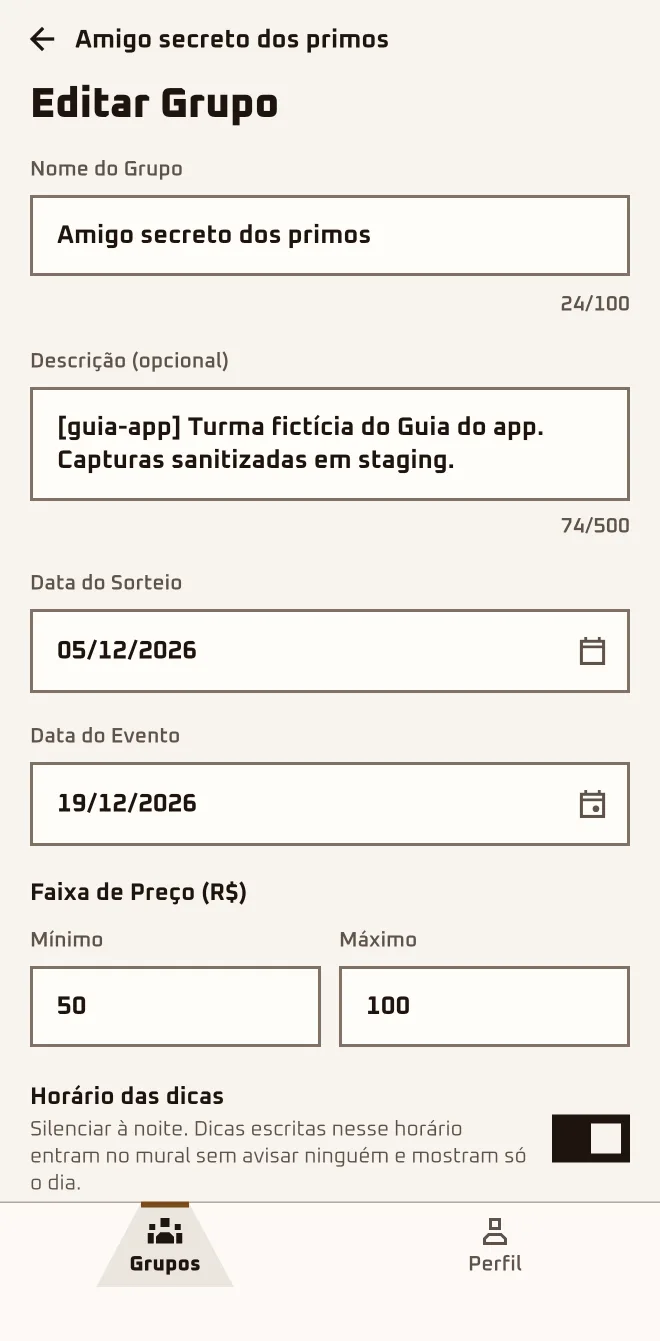
Adjust dates and budget in "Edit"
Only the organizer can change these. Name, description and price range change whenever you like; after the draw, the "Draw Date" locks.
- 2
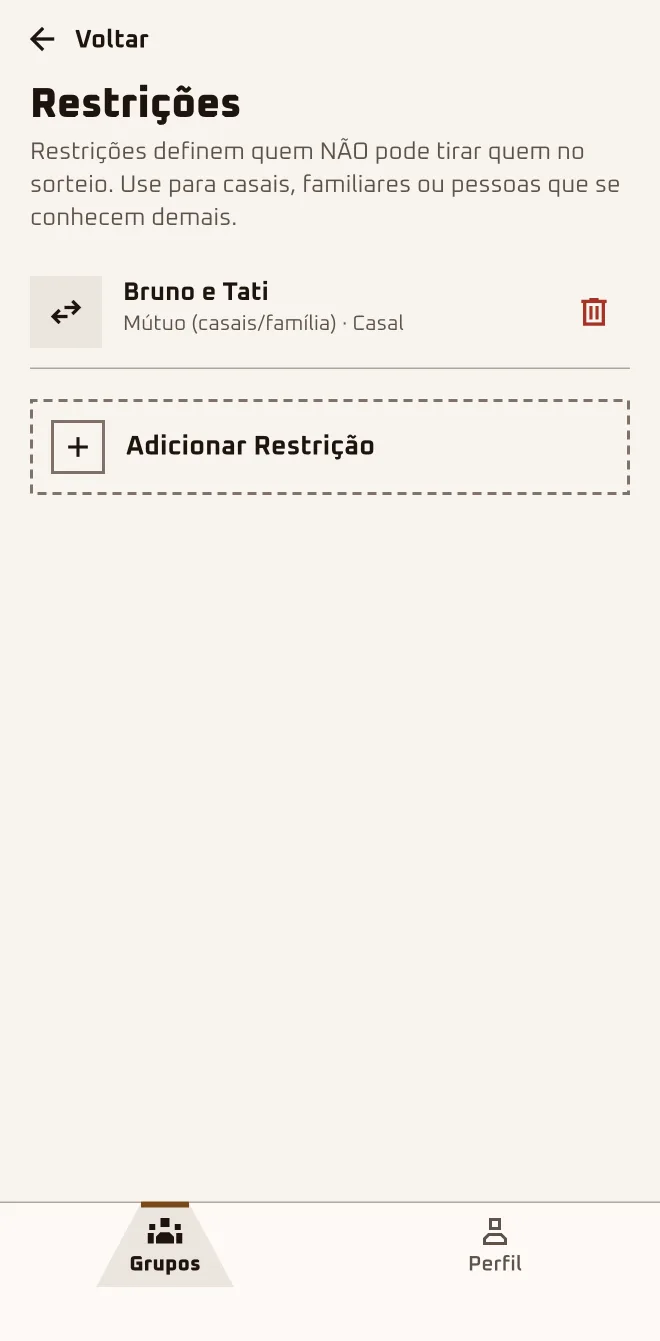
Say who can't draw whom
In "Add Restriction", pick the two people, choose "Mutual (couples/family)" or "One-way". Only before the draw, with both already approved.
- 3
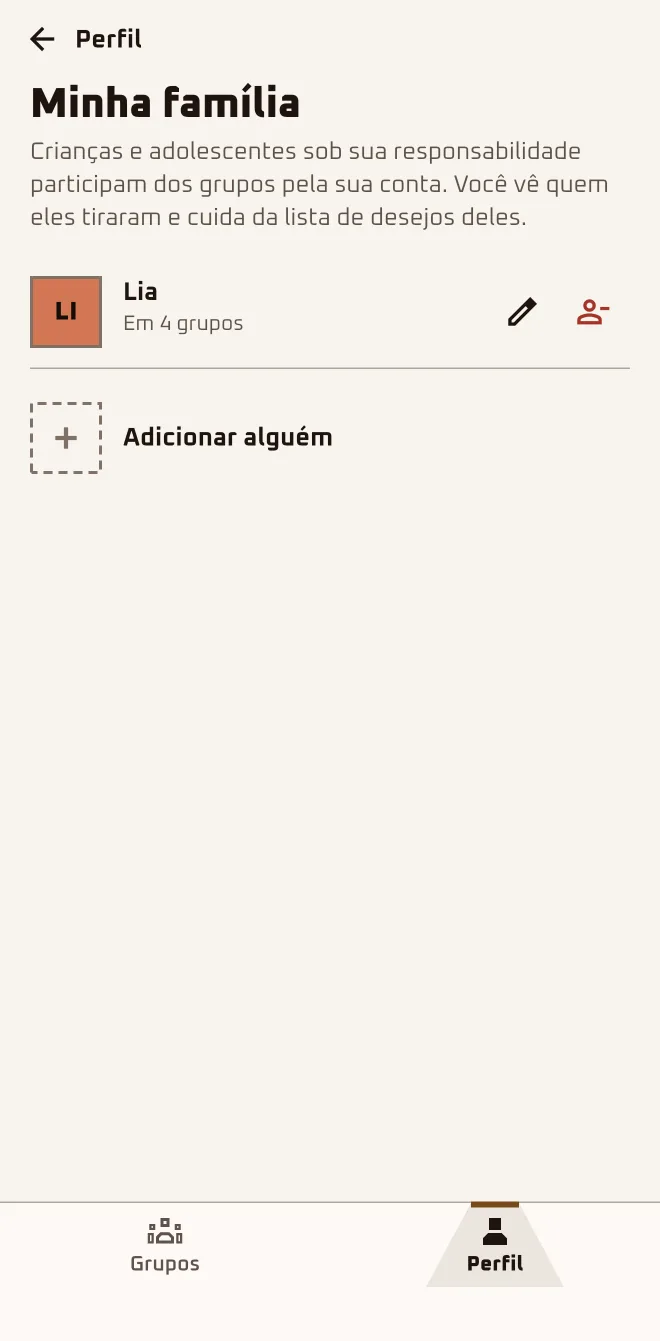
Register anyone without an account
In Profile › Account › "My family" › "Add someone", all you enter is a "Nickname". You need to be 18 or older; each guardian can add up to 5 people.
- 4
Add the child to the group
Tap "Add a family member" and pick the name under "Who's joining?". It only works before the draw, once your own spot is approved.
- 5
Send the teen the link
Anyone 13 or older creates their own account and joins through the link or the code, with no family step.
Restrictions and family: not after the draw.
Too many restrictions can block the draw: if that happens, the app warns you and saves nothing. Whoever adds someone from their family never draws that person and is never drawn by them; siblings can draw each other.
Questions about this chapter
Couples can't draw each other. How do I set that up?
With a restriction. In "More in this group" › "Management" › "Restrictions", tap "Add Restriction", pick the two of them and choose "Mutual (couples/family)". Only the organizer creates restrictions, before the draw, between people already approved: if one is still under "Waiting for approval", let them in first.
I set the wrong restriction. Can I delete it?
Yes, as long as the draw hasn't happened; after it, the "Restrictions" screen disappears from the group. In "Restrictions", tap the trash can next to the wrong one and confirm with "Remove". The app replies "Restriction removed", and then you just create the right one in "Add Restriction".
My 9-year-old wants to join and doesn't have a phone.
They join through your account; under 13 that's the only way. In "My family" › "Add someone", all you enter is a "Nickname", and you confirm you're the parent or legal guardian. In the group, tap "Add a family member" and pick the name under "Who's joining?", before the draw and only in the app.
What does the child see in the app?
Nothing on a phone of their own: everything goes through your account. The others see only the nickname and the "Family" badge; the app doesn't store the child's age or photo. In the group, open "More in this group": the "{name}'s participation" section has "Wishlist", "Drawn person's wishlist", "Chats" and "Hints".
My son is 15 and has a phone. Does he need to join through family?
No. At 13 or older, he can create his own account and join through the link like anyone else. The Store tab stays there for him; what's adult-only is the "Find a gift" button on each hint (it opens the Store), the Store suggestions and the price-drop alert. Send him the link and let him in when he asks to join.
Can I change the get-together date after the draw?
Yes, but only forward: after the draw, the get-together date can be extended, never shortened, and extending it adds new doors to the journey. The draw date, on the other hand, locks for good. To change the date, open the group, tap "More options" › "Edit" and adjust "Event Date".
What currency shows up in the group?
The one from the country of whoever creates the group: Brazil in reais, Colombia in Colombian pesos, Mexico in Mexican pesos. With no country set, it stays in reais. Check Profile › Account › "Your country" before creating the group: the budget field shows the right currency, "Price Range (R$)" in Brazil.